

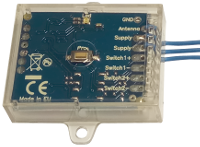
Creasol UniRec1 universal receiver can be connected to the SCS SENTINEL board ACCESS-602 to allow controlling that board by another kind of remote control, for example to use a single remote control to open more than one automation.
Connect one Power Supply wire to terminal 11
Connect the other Power Supply wire to terminal 12
Connect Switch+ to terminal 4
Connect Switch- to terminal 3
Then, program the receiver to learn one or more remote controls, and check that it works.
If it does not open the automation, exchange the connections to terminal 4 with terminal 3, and vice versa.
New and updated products
News
- Making a DIY homemade Smart Wallbox working with Home Assistant to charge electric vehicles
- Creasol DomBusGateway: DomBus 2 MQTT bridge for HomeAssistant, NodeRED, OpenHAB, ioBroker, MQTT...
- Hourly electricity prices and costs, solar photovoltaic energy production forecast and Power System Flexibility: Domoticz script
- FAQ veicoli elettrici e fotovoltaico
- Installing an optimized Rasbian + Domoticz image on Raspberry PI3, PI4 or PI5
- Integrating the light system that uses step-by-step relays, into Home Assistant, Domoticz, ...
- Connecting a network of DomBus modules through TCP (WiFi, Ethernet, ...) or wireless radio link
- How to build a domotic system using DomBus modules
- Suggestions: what to prepare in a new (or renovated) home to be able to automate it
- CR2032 Lithium-Manganese battey passivation layer
- Creasol DomBus and Home Assistant
- Domoticz, reliable free and open source home automation system
How to connect UniRec1 to SCS-SENTINEL ACCESS 602 CTRL 51
Creasol UniRec1 universal receiver can be connected to the SCS SENTINEL board ACCESS-602 to allow controlling that board by another kind of remote control, for example to use a single remote control to open more than one automation.
Connect one Power Supply wire to terminal 11
Connect the other Power Supply wire to terminal 12
Connect Switch+ to terminal 4
Connect Switch- to terminal 3
Then, program the receiver to learn one or more remote controls, and check that it works.
If it does not open the automation, exchange the connections to terminal 4 with terminal 3, and vice versa.
