

¡Abre la puerta de tu garaje, portón , etc. , usando la palanca de las luces altas , en lugar de buscar el control remoto en tu bolso!
Es capaz de copiar hasta 4 mandos a distancia de código fijo, de 433 y 868 MHz.
¡Consulta la página en inglés para ver la versión más actualizada!
Aplicaciones
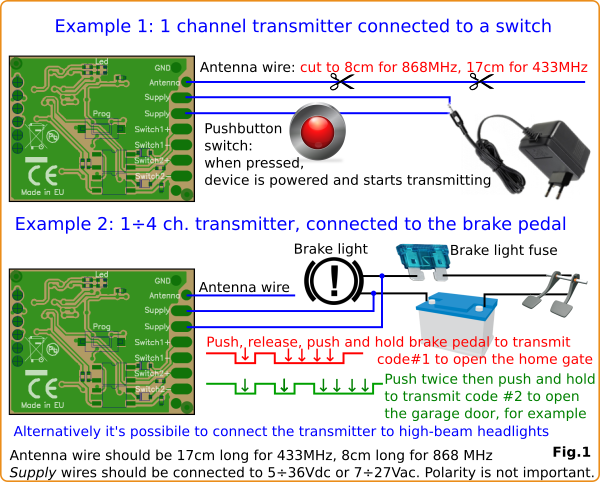
- En un vehículo, permite abrir hasta 4 automatizaciones diferentes (portón, barrera, puerta de garaje, etc.) con solo usar la palanca de las luces largas o el pedal del freno. ¡No hace falta buscar el mando a distancia al acercarse a casa o al trabajo!
- Envía hasta 4 códigos diferentes mediante un simple botón , que se utiliza para enviar alimentación eléctrica (9÷24V) al dispositivo.
- Activa un receptor cuando se alimenta otro dispositivo : por ejemplo, al pulsar el timbre (12 V), este dispositivo se alimenta y transmite una señal que es leída por el sistema de domótica u otro receptor. En este caso, solo se admite un canal.
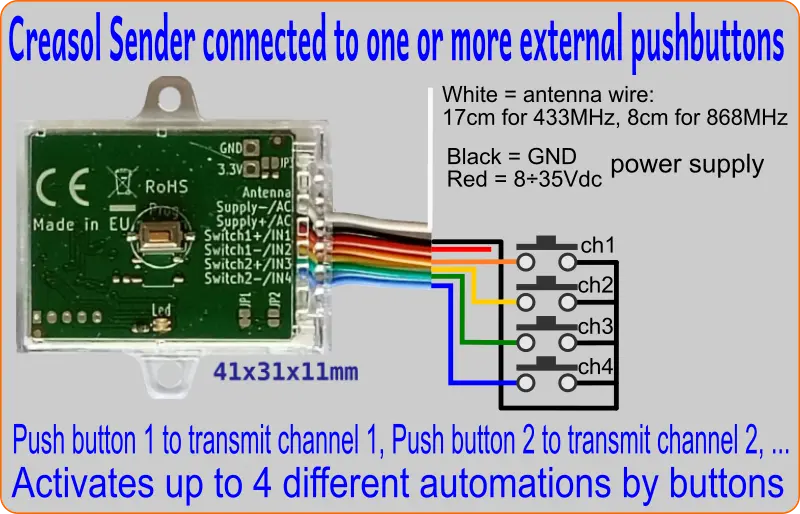
- Conecte una fuente de alimentación de 8 a 35 V CC y hasta 4 botones externos para controlar hasta 4 automatizaciones, ya que se trata de un duplicador de mandos a distancia para mandos a distancia de código fijo.
Características
- Canales independientes: cada canal puede transmitir un tipo de código diferente en una frecuencia diferente.
- Transmitir códigos fijos con modulación OOK.
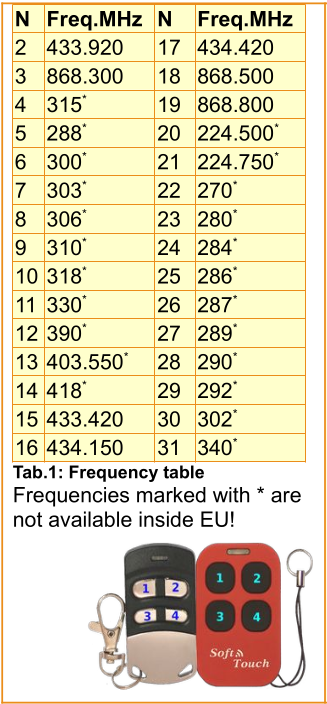
- Frecuencia seleccionable: 433,920 o 868,300 MHz. Fuera de la UE es posible utilizar otras frecuencias.
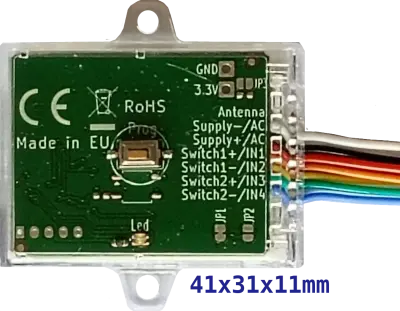
- Dos cables para la fuente de alimentación (8÷35Vdc y 9÷24Vac) + 1 cable para la antena: cortar a 17 cm para 433 MHz o a 8 cm para 868 MHz.
- Convertidor CC/CC de conmutación de alta eficiencia para reducir el consumo y la disipación de energía.
- La potencia de transmisión se puede configurar al valor mínimo que reduzca las interferencias y las colisiones.
- Muy compacto: 41x31x11cm
- La frecuencia, la potencia de transmisión y otros parámetros se pueden programar fácilmente mediante el botón Prog (que se puede pulsar sin abrir la carcasa).
Modos de funcionamiento
Modo 1 (modo básico) : cuando el dispositivo recibe alimentación, comienza a transmitir el código del canal 1. Este modo es adecuado cuando el dispositivo está conectado a un botón o a una salida de relé, de modo que, cuando está activo, queremos que este dispositivo transmita un código para activar un receptor en otro extremo. Solo hay 1 canal disponible en este modo.
Modo 2 (modo botón) : en este caso, el dispositivo se conecta a la fuente de alimentación mediante un botón, con la capacidad de transmitir hasta 4 códigos diferentes (4 canales).
Si se mantiene pulsado el botón durante un tiempo prolongado, se transmite el canal 1.
1 pulso corto + 1 pulso largo para transmitir el canal 2.
2 pulsos cortos + 1 pulso largo para transmitir el canal 3.
3 pulsos cortos + 1 pulso largo para transmitir el canal 4.
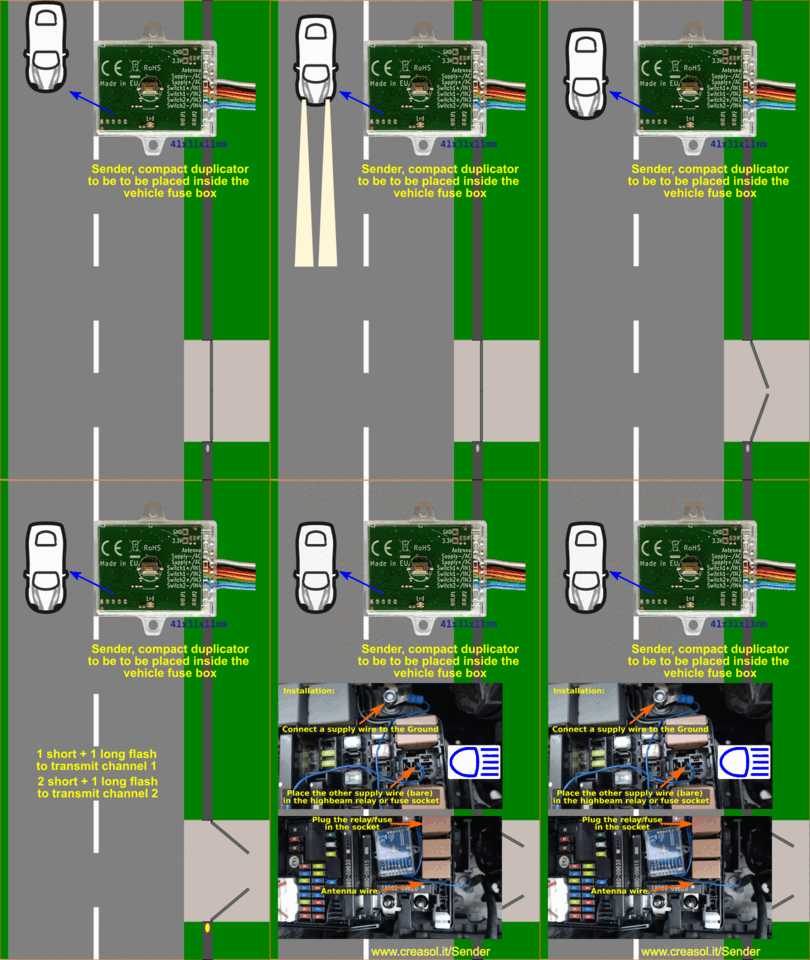
Modo 3 (modo coche) : este modo de funcionamiento es adecuado cuando el dispositivo se utiliza en un vehículo, conectado a la palanca de las luces de carretera o a la luz de freno: normalmente, el dispositivo se coloca en la caja de fusibles del vehículo.
1 pulso corto + 1 pulso largo para transmitir el canal 1.
2 pulsos cortos + 1 pulso largo para transmitir por el canal 2.
3 pulsos cortos + 1 pulso largo para transmitir el canal 3.
4 pulsos cortos + 1 pulso largo para transmitir el canal 4.
Modo 4 (Modo de botones externos) : Se pueden conectar de 1 a 4 botones a IN1, IN2, IN3 e IN4, utilizando GND como conexión común para los botones, y una fuente de alimentación de CC (8-35 V CC). El dispositivo consume aproximadamente 18 mW en modo de espera y permite seleccionar hasta 4 niveles de potencia. De esta forma, es posible crear un teclado para controlar hasta 4 automatizaciones diferentes mediante mandos a distancia con código fijo. Consulte la sección siguiente para obtener una explicación completa.
Instalación en un vehículo y configuración
La instalación debe ser realizada por un técnico cualificado. 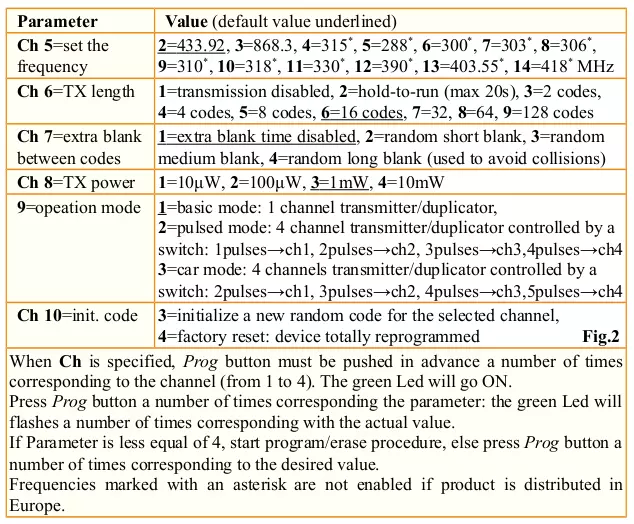
Primero, compruebe que el mando a distancia que desea copiar sea compatible con Creasol_Sender:
- Conecte los cables de alimentación a cualquier fuente de alimentación o batería de 12 o 24 V.
- Configure el dispositivo en "modo coche" , ajuste el parámetro 9 a 3: pulse el botón PROG 9 veces, espere a que el LED parpadee y, a continuación, pulse el botón PROG 3 veces.
- Para configurar la frecuencia de transmisión del canal 1 : pulse el botón PROG 1 (seleccionando el canal 1: el LED se ilumina en verde fijo), luego pulse el botón PROG 5 veces (parámetro de frecuencia: el LED comenzará a parpadear un número de veces correspondiente a la frecuencia actual), luego pulse el botón PROG un número de veces correspondiente a la frecuencia necesaria (2 para 433,92 MHz, 3 para 868,3 MHz).
- Copia el control remoto existente : pulsa el botón PROG una vez (para seleccionar el canal 1), luego pulsa el botón PROG dos veces (para comenzar a recibir el código del control remoto original): el LED comenzará a parpadear lentamente. En 10 segundos, pulsa el botón del control remoto original: el LED verde emitirá dos destellos (el código se ha copiado) o cuatro destellos (código variable: en este caso, lo más probable es que Creasol-Sender no funcione).
- Pruebe el canal programado, simulando un destello corto de luz alta seguido de un destello largo: desconecte la alimentación durante unos segundos, luego conéctela durante menos de medio segundo, desconéctela durante menos de medio segundo y luego vuelva a conectarla durante unos segundos: el LED rojo parpadea mientras transmite, por lo que es posible verificar que la automatización (puerta, puerta de garaje, etc.) se activa mediante Creasol-Sender.
- Si el tiempo de transmisión es demasiado corto, aumente el parámetro: pulse el botón PROG 1 vez (para seleccionar el canal 1), luego pulse PROG 6 veces (parámetro 6: el LED parpadeará N veces indicando el valor actual), luego pulse el botón PROG 7 u 8 veces para aumentar el tiempo de transmisión.
Si se deben programar otros canales, repita los pasos 3-6 seleccionando el canal correcto: 2, 3 o 4 en lugar de 1.
Si CreasolSender es compatible con su automatización (pudo activar la automatización en el paso 5),
- Corte el cable de la antena a 17 cm para 433 MHz, o a 8 cm para 868 MHz .
- Consulte el manual del vehículo para localizar la caja de fusibles con el fusible o relé de las luces altas. Coloque el dispositivo en la caja de fusibles (o en otra carcasa protegida adecuada) y conecte un cable de alimentación a la bobina del fusible o relé de las luces altas, o el otro cable a tierra (chasis del vehículo). La tensión de alimentación debe estar entre 6 y 35 V. Asegúrese de que no se aplique alimentación al sensor CreasolSender cuando las luces altas estén apagadas.
Tenga cuidado con la conexión: utilice un extractor de fusibles o, alternativamente, retire el fusible o relé, coloque el cable pelado en el portafusibles/relés y vuelva a conectar el fusible/relé con cuidado. ¡ Esta operación debe ser realizada por un técnico!
Ahora es posible probar el dispositivo. Realice un destello corto de luz alta seguido de un destello largo para transmitir por el canal 1: el último destello debe durar al menos 1 segundo, para proporcionar al Creasol-Sender suficiente energía para transmitir el código y permitir que la automatización (puerta, barrera, etc.) decodifique los datos transmitidos.
Para transmitir el código asociado al canal 2, emita dos destellos cortos seguidos de un destello largo. El procedimiento es similar para los canales 3 y 4.
Control de hasta 4 automatizaciones mediante teclado (Modo 4)
CreasolSender tiene la capacidad de conectarse a 4 pulsadores externos para transmitir hasta 4 códigos fijos diferentes : el pulsador n.° 1, conectado al cable naranja, para transmitir el código n.° 1; el pulsador n.° 2, conectado al cable verde, para transmitir el código n.° 2, y así sucesivamente.
En caso de que se deba controlar una automatización de código variable, se debe conectar un receptor adicional (como UniRec1 ) a dicha automatización, ya que el emisor no puede transmitir códigos variables.
Instalación y configuración del modo 4
- Conecte una fuente de alimentación de 8 a 35 V CC a los cables rojo y negro (rojo = positivo, negro = negativo).
- Conecte el botón n.° 1 entre los cables naranja y negro.
- Conecte el botón n.° 2 entre los cables amarillo y negro, si es necesario.
- Conecte el botón n.° 3 entre los cables verde y negro, si es necesario.
- Conecte el botón n.° 4 entre los cables azul y negro, si es necesario.
- Configure el dispositivo para que funcione en el Modo 4: pulse el botón Prog 9 veces (modo de funcionamiento), espere a que el LED muestre la configuración actual y, a continuación, pulse el botón Prog 4 veces para seleccionar el modo Botones externos.
- Para cada canal, programe la frecuencia si es diferente de 433,92 MHz: pulse el botón un número de veces correspondiente al canal seleccionado (de 1 a 4), luego pulse el botón 5 veces (frecuencia), luego pulse el botón 2 veces para 433,92 MHz, 3 veces para 868,3 MHz, ...
- Copiar el control remoto original: presione el botón varias veces según el canal, espere a que el LED se encienda de forma continua y luego presione el botón dos veces para iniciar el procedimiento de copia; el LED comenzará a parpadear lentamente y, en 5 segundos, comenzará a transmitir el código del control remoto original para copiarlo: si el procedimiento finaliza correctamente, el LED parpadeará dos veces.
- Repita los pasos 6, 7 y 8 para los demás canales que deban programarse.
El dispositivo se suministra en un práctico estuche transparente y reciclable con instrucciones impresas en varios idiomas. Las empresas interesadas en adquirir este producto pueden enviar un correo electrónico a
Documentación

Notas de aplicación
Utilizar Creasol-Sender en un vehículo (coche, furgoneta, bicicleta, ...) para abrir portones, puertas de garaje y barreras de tráfico mediante el parpadeo de las luces largas.
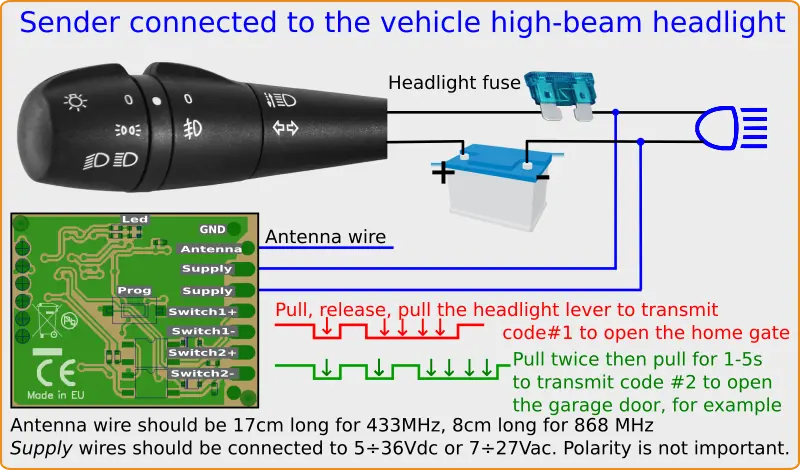
En esta aplicación, Creasol-Sender se alimenta mediante la palanca de luces largas del vehículo para controlar hasta 4 automatizaciones (puertas de garaje, portones, barreras, ...):
- 1 destello corto + destello largo => transmite el canal 1 (para abrir, por ejemplo, la puerta de entrada)
- 2 destellos cortos + destello largo => transmite el canal 2 (para abrir, por ejemplo, la puerta del garaje de casa)
- 3 destellos cortos + destello largo => transmite el canal 3 (para abrir, por ejemplo, una barrera de tráfico en funcionamiento)
- 4 destellos cortos + destello largo => transmite el canal 4 (para abrir, por ejemplo, la puerta de una casa de vacaciones)
Esta es una solución muy fácil y segura para activar automatizaciones desde tu coche, camión o motocicleta, sin distraerte buscando el mando a distancia. Ten en cuenta que Creasol-Sender solo puede copiar mandos a distancia de código fijo: si tu automatización utiliza mandos a distancia de código variable, tendrás que añadir un receptor universal, como Creasol UniRec1 o UniRec2 , a dicha automatización.
Instalación en un vehículo
La instalación debe ser realizada por un técnico cualificado.
Primero, compruebe que el mando a distancia que desea copiar sea compatible con Creasol_Sender:
- Conecte los cables de alimentación a cualquier fuente de alimentación o batería de 12 o 24 V.
- Configure el parámetro 9 a 3 para configurar el "modo coche": pulse el botón PROG 9 veces, espere a que el LED parpadee y, a continuación, pulse el botón PROG 3 veces.
- Para configurar la frecuencia del canal 1: pulse el botón PROG 1 (para seleccionar el canal 1, el LED se iluminará en verde fijo), pulse el botón PROG 5 veces (parámetro de frecuencia: el LED comenzará a parpadear un número de veces correspondiente a la frecuencia actual) y, a continuación, pulse el botón PROG un número de veces correspondiente a la frecuencia deseada (2 para 433,92 MHz, 3 para 868,3 MHz).
- Ahora copie el control remoto existente: presione el botón PROG 1 vez (para seleccionar el canal 1), luego presione el botón PROG 2 veces (para comenzar a recibir el código del control remoto original): el LED comenzará a parpadear lentamente. Dentro de 10 segundos, presione el botón en el control remoto original: el LED verde emitirá 2 destellos (el código se ha copiado) o 4 destellos (código variable: en este caso, lo más probable es que Creasol-Sender no funcione).
- Para probar el canal programado, desconecte la alimentación durante unos segundos, luego conéctela durante menos de medio segundo, desconéctela durante menos de medio segundo y vuelva a conectarla durante unos segundos: el LED rojo parpadeará durante la transmisión, lo que permite verificar que la automatización (puerta, puerta de garaje, etc.) se activa mediante Creasol-Sender.
- Si el tiempo de transmisión es demasiado corto, aumente el parámetro: pulse el botón PROG 1 vez (para seleccionar el canal 1), luego pulse PROG 6 veces (parámetro 6: el LED parpadeará N veces indicando el valor actual), luego pulse el botón PROG 7 u 8 veces para aumentar el tiempo de transmisión.
Si se deben programar otros canales, repita los pasos 3-6 seleccionando el canal correcto: 2, 3 o 4 en lugar de 1.
Si CreasolSender es compatible con su automatización (pudo activar la automatización en el paso 5),
- Corte el cable de la antena a 17 cm para 433 MHz, o a 8 cm para 868 MHz.
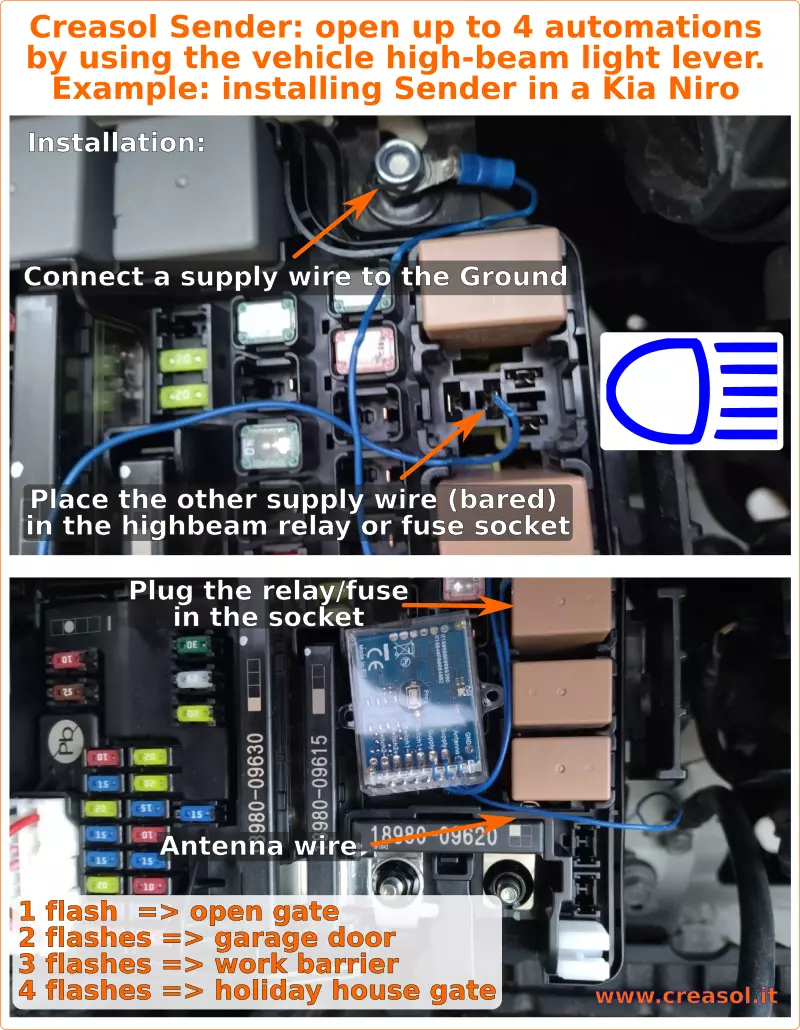
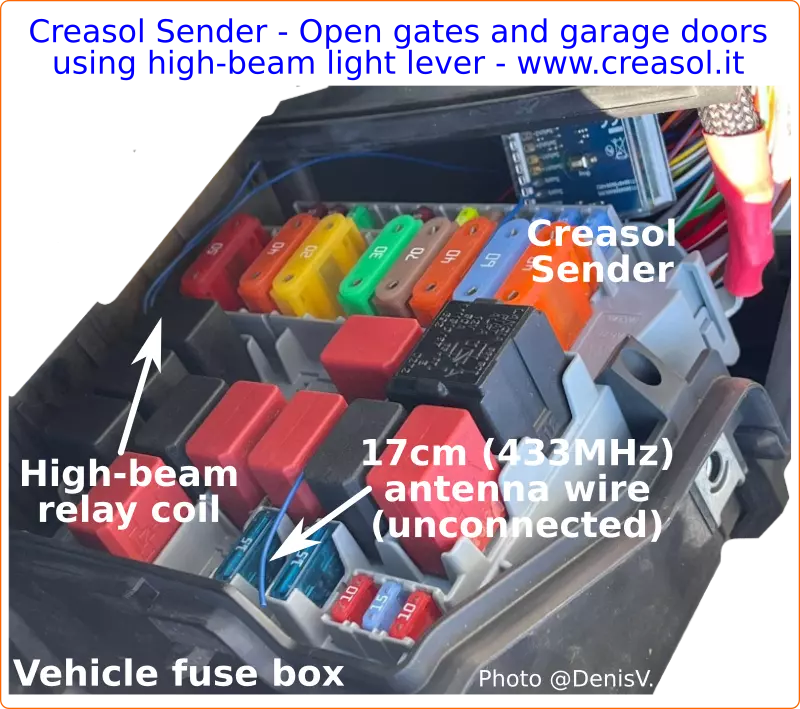
- Consulte el manual del vehículo para localizar la caja de fusibles con el fusible o relé de las luces altas. Coloque el dispositivo en la caja de fusibles (o en otra carcasa protegida adecuada) y conecte un cable de alimentación a la bobina del fusible o relé de las luces altas, o el otro cable a tierra (chasis del vehículo). La tensión de alimentación debe estar entre 6 y 35 V. Asegúrese de que no se aplique alimentación al sensor CreasolSender cuando las luces altas estén apagadas.
Tenga cuidado con la conexión: utilice un extractor de fusibles o, alternativamente, retire el fusible o relé, coloque el cable pelado en el portafusibles/relés y vuelva a conectar el fusible/relé con cuidado. ¡ Esta operación debe ser realizada por un técnico!
Ahora es posible probar el dispositivo. Realice un breve destello de luz alta seguido de un destello largo para transmitir por el canal 1: el último destello debe durar al menos 1 segundo, para proporcionar al Creasol-Sender suficiente luz para transmitir el código y permitir que la automatización (puerta, barrera, etc.) decodifique los datos transmitidos.
Para transmitir el código asociado al canal 2, emita dos destellos cortos seguidos de un destello largo. El procedimiento es similar para los canales 3 y 4.
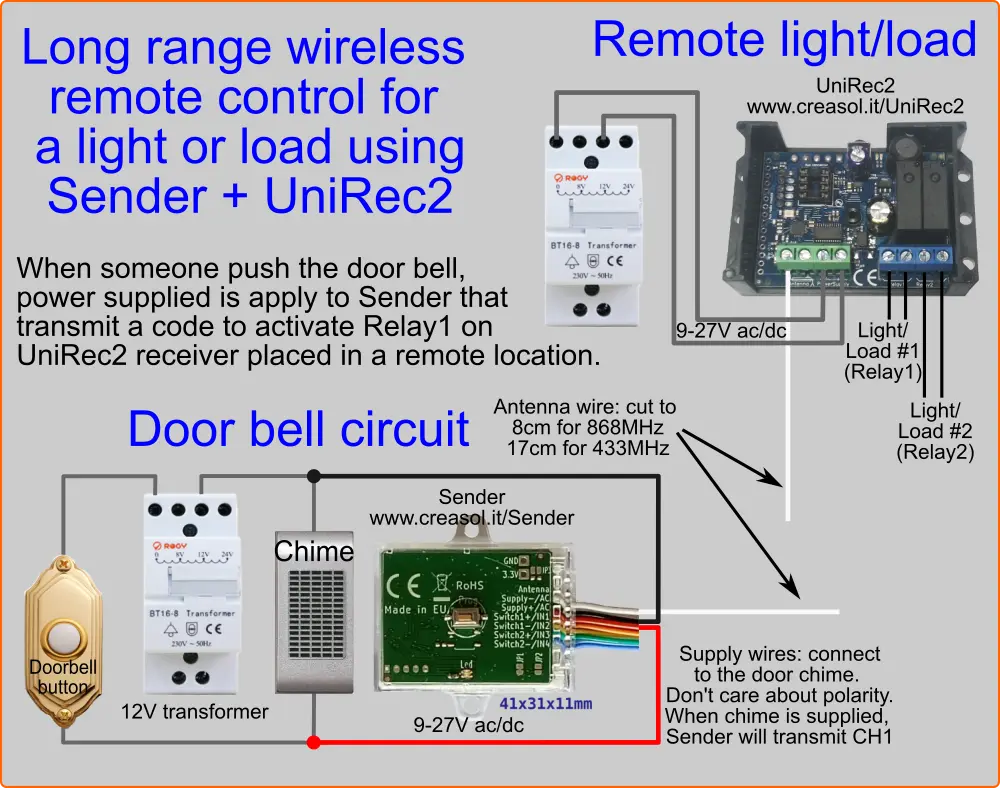
Activar una luz o carga remota cuando alguien pulse el botón del timbre (u otro botón).
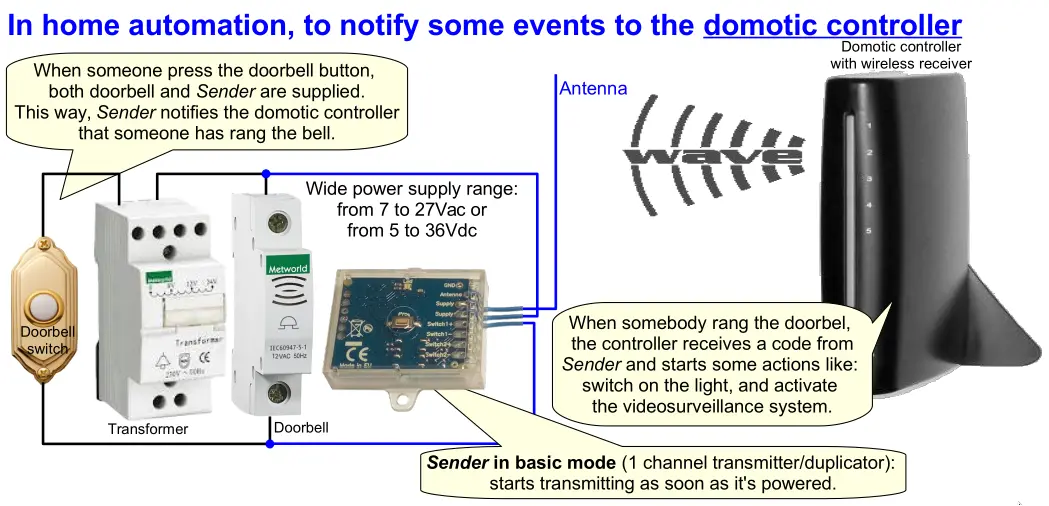
El siguiente diagrama muestra una solución para controlar a distancia una luz u otro dispositivo cuando alguien pulsa un botón, utilizando una conexión inalámbrica de largo alcance a 433 u 868 MHz.
Timbre conectado a un controlador domótico
La siguiente imagen muestra cómo conectar el transmisor en modo básico (Modo 1) para que, al pulsar un botón, comience a transmitir inmediatamente un código para activar un dispositivo remoto (un controlador domótico con receptor integrado, por ejemplo, u otro dispositivo con receptor adicional).
Instalación
- Conecte los cables de alimentación a cualquier fuente de alimentación o batería de 12 o 24 V.
- Configure el parámetro 9 a 1 para establecer el "modo básico": presione el botón PROG 9 veces, espere a que el LED parpadee y luego presione el botón PROG 1 vez.
- Para configurar la frecuencia del canal 1: pulse el botón PROG 1 (para seleccionar el canal 1, el LED se iluminará en verde fijo), pulse el botón PROG 5 veces (parámetro de frecuencia: el LED comenzará a parpadear un número de veces correspondiente a la frecuencia actual) y, a continuación, pulse el botón PROG un número de veces correspondiente a la frecuencia deseada (2 para 433,92 MHz, 3 para 868,3 MHz).
- Ahora copie el control remoto existente: presione el botón PROG 1 vez (para seleccionar el canal 1), luego presione el botón PROG 2 veces (para comenzar a recibir el código del control remoto original): el LED comenzará a parpadear lentamente. Dentro de 10 segundos, presione el botón en el control remoto original: el LED verde emitirá 2 destellos (el código se ha copiado) o 4 destellos (código variable: en este caso, lo más probable es que Creasol-Sender no funcione).
- Para probar el canal programado, desconecte la alimentación durante unos segundos y luego vuelva a conectarla: el LED rojo parpadeará durante la transmisión, lo que permite verificar que la automatización (puerta, puerta de garaje, etc.) se activa mediante Creasol-Sender.
- Si el tiempo de transmisión es demasiado corto, aumente el parámetro: pulse el botón PROG 1 vez (para seleccionar el canal 1), luego pulse PROG 6 veces (parámetro 6: el LED parpadeará N veces indicando el valor actual), luego pulse el botón PROG 6-8 veces para aumentar el tiempo de transmisión.
Nota: en modo básico, solo se admite 1 canal.
Si CreasolSender es compatible con su automatización (pudo activar la automatización en el paso 5),
- Corte el cable de la antena a 17 cm para 433 MHz, o a 8 cm para 868 MHz.
- Conecte los cables de alimentación de CreasolSender como se indica en el esquema anterior.
Remote controls compatible with Creasol Sender and Creasol SenderBatt
Cannot find your remote control in the Compatible and Incompatible tables below?
Please send a message by Telegram or Whatsapp to +393283730010 including remote control pictures, brand and model.
| Company | Frequency | Models | Photo | Frequency value (cmd=5) | Notes |
| ADYX | 433.920 | ALIZE EM2C, ALIZE EM4C |  |
2 | |
| AETERNA | 433.920 | TX433 1,2,4 buttons |  |
2 | |
| ALLMATIC | 306.000 | ALLMATIC ASMX2, ASMX4 |  |
8 | Original remote controls may be not stable in frequency |
| 433.920 | ALLMATIC AEMX1, AEMX2, AEMX4 |  |
2 | ||
| EUROPE AUTO ARMY1, ARMY2, ARMY4 |  |
2 | |||
| ALLMATIC MX1, MX2, MX4 |  |
2 | |||
| ALLTRONIK | 433.920 |
S429_1, S429_2, S429_4, S429_M Be sure that your remote operates at 433.92MHz! |
  |
2 | |
| S425 |  |
2 | |||
| ANSONIC | 433.920 | SA 434-1E, SA434-2E, SA434-3E, SA434-4E |
 |
2 | |
| SA 434-1MINI, SA434-2MINI, SA 434-2Midi |  |
2 | |||
| 868.350 | SA 868-1E, SA 868-2E, SA868-3E, SA868-4E | |
3 |
||
| SA 868-1mini/M, SA 868-2mini/M (dip switch version) |  |
3 |
|||
| APERTO | 433.920 | CPS1, CPS2, CPS |
 |
2 | |
| AVIDSEN | 433.920 | 100601 micromark MM23164 |  |
2 | |
| 104505 |  |
2 | |||
| 100951, 100955, 100550, 100400 |  |
2 | |||
| BANDY | 433.920 |  |
2 | Not sure it work, because this is a duplicator: check the original remote control | |
| BELFOX | 433.920 | DHS433-1, DHS433-2, DHS433-4, dip switch version |  |
2 | |
| DHS 433,92 (7733), dip switch version |  |
2 | |||
| 868.350 | DHS 868,3, dipswitch version | |
3 |
||
| HS 868-20 |  |
3 |
|||
| BENINCA' | 306.000 | LOT1A, LOT2A, LOT4A |  |
8 | Original remote controls may be not stable in frequency |
| LOTX1A, LOTX2A, LOTX4A |  |
8 | Original remote controls may be not stable in frequency | ||
| LO.TX2PS |  |
8 | Original remote controls may be not stable in frequency | ||
| 433.920 | LOT1W, LOT2W, LOT4W |  |
2 | ||
| LOT2WMS |  |
2 | |||
| T2WK, T4WK |  |
2 | |||
| LOTX1W, LOTX2W, LOTX4W |  |
2 | |||
| TO.GO2WP, TO.GO4WP, TO.GO2WK, TO.GO4WK |  |
2 | |||
| BERNER | 868.300 | Berner BHS140 |  |
3 | Firmware Rev.03c or later |
| Berner BHS130 |  |
3 | Firmware Rev.03d or later | ||
| BESIDE | 433.920 | BEZAP |  |
2 | |
| HIT |  |
2 | |||
| BETA ELETTRONICA | 315.000 |
BETALARM 6500 |
 |
4 | Original remote controls may be not stable in frequency |
| 330.000 | BETALARM 5500 |  |
11 | Original remote controls may be not stable in frequency | |
| BFT | 306.000 | RCS |  |
8 | Original remote controls may be not stable in frequency |
| 315.000 | VTM1, VTM2, VTM4 |  |
4 | Original remote controls may be not stable in frequency | |
| 418.000 | GT01, GT02, GT04 |  |
14 | ||
| 433.920 | TE01, TE02 ( TEO1, TEO2 ) |  |
2 | ||
| TE04 ( TEO4 ) | |
2 | |||
|
BFT MITTO 2, MITTO 4, MITTO-2A, BFT MITTO-4A, MITTO-2M, MITTO-4M |
 |
2 | |||
| BOSS Openers STEEL-LINE Automation Centurion Guardian |
303.000 | BOSS HT4 6211-L 1,2 and 4 buttons, Boss BHT4, Boss HT3 blue led, Guardian 2211-L, Centurion 2211L, LYNX 2211L, MODERN 2211L 1 and 2 BUTTONs, STEEL-LINE 2211L 1, 2 and 4 BUTTON, STEEL-LINE HT3 BLUE LED, Garage Door Openers BRD1, BRD2, BRD3, BRD4, BRD9, RD1, RD2, RD3, RD4, RD9, BOL4, BOL5, BOL6, BOL9, OL4, OL5, OL6 | 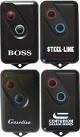 |
7 | Only versions from March 2017: ask for confirmation |
| BREDA | 433.920 | Breda TOP432SA | Like CAME TOP432SA, blue | 2 | |
| CAME | 315.000 | Came T312M, T314M | 4 | Original remote controls may be not stable in frequency | |
| Came TOP312, TOP314 |  |
4 | |||
| Came TOP312NA, TOP314NA |  |
4 | |||
| 433.920 | Came T432, T434 Came TOP432A, TOP434A, TOP432, TOP432NA, TOP434NA, Came Came TAM432, TAM434, TAM438 |
 |
2 | ||
| Came TOP432M, TOP434M |  |
2 | |||
| Came TAM432SA |  |
2 | |||
| Came TOP432SA |  |
2 | |||
| Came TOP432NA, TOP434NA |
 |
2 | |||
| Came TWIN2, TWIN4 |  |
2 | |||
| CAME TOP-432EE, CAME TOP434EE |  |
2 | Note that this remote control can be programmed to generate a fixed code or a rolling code. Duplication works only if programmed as fixed code! | ||
| CAME TOP-432EV, TOP-434EV |  |
2 | |||
| 868.350 | CAME TOP862NA, Came TOP864NA |  |
3 | ||
| CARDIN | 300.000 | S300 |  |
6 | Original remote controls may be not stable in frequency |
| 310.000 | S301, S302 | |
9 | Original remote controls may be not stable in frequency | |
| 433.920 | S476 TX2, S476TX4 |  |
2 | ||
|
CASALI |
330.000 |  |
11 | Original remote controls may be not stable in frequency | |
| 433.920 | Genius 433 2, Genius 433 3, JA400 TM433, JA401 TM433 |  |
2 |
||
| CASIT | 306.000 | ERTS92B, ERTS92T |  |
8 |
Original remote controls may be not stable in frequency |
| 433.920 | ERTS92B, ERTS92T |  |
2 |
||
| ERTS20DB, ERTS20DQ |  |
2 |
|||
| ERTS476D, ERTS476Q |  |
2 |
|||
| TXS1, TXS2, TXS3, TXS4, TXS6 ERTS97B, ERTS97T |
 |
2 |
|||
| CEDAMATIC | 433.920 | Cedamatic AEMX4, AEMX2, AEMX1 | |
2 | |
| CELINSA | 433.920 | S10 1, S10 2, SAW1, SAW2 |  |
2 |
|
| CENTURION | 433.920 | CLASSIC, SMART, SMART2 |  |
2 |
|
| CHAMBERLAIN LIFTMASTER MOTORLIFT SEARS CRAFTSMAN |
300.000 | Chamberlain 300MC (multicode) |  |
Not supported yet! |
|
| 315.000 | 333LM |  |
Not supported yet! |
||
| 360LM, 362LM, 363LM |  |
Not supported yet! | |||
| 390.000 | 50CB, 53CB, 750CB, 753CB, 50LM, 53LM, 61LM, 62LM, 63LM, 139.53100, 139.53110, 139.53200, 139.53210 | |
Not supported yet! | ||
| 54CB, 756CB, 54LM, 64LM, 859CB |  |
Not supported yet! | |||
| 850CB, 853CB, 959CB, 81LM, 82LM, 83LM, 84LM, 99LM |
 |
Not supported yet! | |||
| 33LM | |
Not supported yet! | |||
| 418.000 | 4180, 4182, 4183 | |
Not supported yet! | ||
| 4185 |  |
Not supported yet! | |||
|
787 remote
less entry |
 |
Not supported yet! | |||
| 433.920 | 4330E, 4332E, 4333E | |
Not supported yet! | ||
| 4335E | |
Not supported yet! | |||
| CPS | 433.920 | TCP3, CPS, Jolly 4 |  |
2 |
|
| CPS1 TCP3, CPS2 TCP3, CPS4 TCP3 EM1CV, EM2CV, EM4CV |
|
2 |
|||
| DASPI | 433.920 | Daspi Happy2 433, Daspi Pops2 |  |
2 |
|
| Daspi Zero2, Zero2CLO, Zero4CLO |   |
2 | |||
| DEA | 306.000 | 306 1, 306 2, 306 4 |  |
8 |
Original remote controls may be not stable in frequency |
| 306 |  |
8 |
Original remote controls may be not stable in frequency | ||
| 433.920 | 433 1, 433 2, 433 4, Gold S1, Gold S2 Dea Gold 238 S1, Dea Gold 238 S2, Dea Gold 239 S4 |
 |
2 |
||
| Genie |  |
2 |
|||
| Punto S2 |  |
2 |
|||
| Dea MIO TD2, MIO TD4 |  |
2 |
|||
| DELMA | 300.000 | Apollo 300, ELSAMEC Apollo 300 |  |
6 |
Original remote controls may be not stable in frequency |
| Mizard 300 1, Mizard 300 2, King |  |
6 |
Original remote controls may be not stable in frequency | ||
| 433.920 | Mizard 433 1, Mizard 433 2 |  |
2 |
||
| King 433 2 |  |
2 |
|||
| Style Copy 2CH (this is a code duplicator) |  |
2 |
|||
| DICKERT | 433.920 | Dickert MAHS433 01, MAHS433 04 Note: we can NOT guarantee that it can be duplicated, because it depends by the receiver. |
 |
Not supported yet! |
|
| Dickert S10-433A1L00, S10-433A4L00, S20-433A1L00, S20-433A4L00, S20-433A1000, S20-433A4000 Note: only RED buttons model can be duplicated! |
 |
2 |
|||
|
Dickert S5-433-A2L00, S5U-433-A2L00 |
 |
2 |
|||
| 868.350 | Dickert HS868-21 Note: only RED buttons model can be duplicated! |
 |
3 |
||
|
Dickert S5-868A2L00, S5U-868A2L00 |
|
3 |
|||
| Dickert S10-868A100, S10-868A400, S20-868A1L00, S20-868A4L00, S20-868A1000, S20-868A4000 Note: only RED buttons model can be duplicated! |
|
3 |
|||
| Dickert S5-868A2L01, S10-868A1L01, S10-868-A4L06, green buttons |  |
3 | Firmware Rev.03c or later | ||
| DIGICODE | 300.000 310.000 |
DC5010, DC5012, DC5030, DC5032, DC5040, DC5042, DC5060, DC5062, DC5070, DC5072 |  |
6 or 9 |
Original remote controls may be not stable in frequency |
| DITEC | 433.920 | GOL4C |  |
2 |
|
| DOITRAND FDOITRAND |
433.920 | MPSTF2E JAUNE, MPSTF4E, HYPERPHONE MPSTF2E_GRISE |  |
2 |
|
| TS2DE, TS4DE |
 |
2 |
|||
| DOORHAN | 433,920 |  |
2 | ||
| DOORMATIC | 433.920 | SAW |  |
2 |
|
|
DUCATI |
433.920 | TSAW1, TSAW2, TSAW3, TSAW4, 124 ELBER TSAW1, TSAW2, TSAW3, TSAW4 RONDY TSAW1, RONDY TSAW2, RONDY TSAW3 |
 |
2 |
|
| TPR10-A, TPR20-A RONDY TPR10_A, RONDY TPR20_A |
 |
2 |
|||
| TE2 |  |
2 |
|||
| 6203blue and transparent, with transparent buttons |
|
2 |
|||
|
DÜWI |
433.920 |
Several models, handsender used for radio sockets |
2 |
||
| ELBE | 433.920 | 501, 502, 504 |  |
2 |
|
| 502a, 504a |  |
2 |
|||
| 502, 504 |  |
2 |
|||
| ELCA | 300.000 | Aster 1100, Aster 1101 |  |
6 |
Original remote controls may be not stable in frequency |
| 433.920 |
IRIS, IRIS 9CH. |
 |
2 |
||
| ASTER2 |  |
2 |
|||
| Aster 1000, Aster1001. Colors: black, blue, light grey |
 |
2 |
|||
| GEMINI 9CH |  |
2 |
|||
| VIRGO |  |
2 |
|||
|
ELDAT |
433.920 | Eldat Basewave RT20-4103M-01, RT20-4104M-01, Eldat RT20-4k, Eldat RT35-4104M-01, RT35-4k, Eldat RT21-4101M-01, RT21-4102M-01, MFZ 400033 , MFZ RT20-4104M-01 |  |
2 | |
| Eldat RT22-4139-011-01: remote control programmer |  |
2 | |||
| Eldat Basewave RT28-4101M-01, RT27-4101M-01, RT26-4101M-02, RT21-4125M-01, RT21-4139M-01, RT21-4139M-02, RT31-4139M-01, RT31-4139M-02, RTC02-4104M-01 |  |
2 | |||
| 868.300 | Eldat Basewave RT20-5004M-01, RT20-5003M-01, Eldat RT20-5k, Eldat RT35-5004M-01, RT35-5k, Eldat RT21-5001M-01, RT21-5002M-01, NASSAU RT20-4K | |
3 | ||
| Eldat Basewave RT28-5001M-01, RT27-5001M-01, RT26-5001M-02, RT21-5025M-01, RT21-5039M-01, RT21-5039M-02, RT31-5039M-01, RT31-5039M-02, RTC02-5004M-01 | |
3 | |||
|
ELV |
868.350 | FS20 S4, FS20 S8, FS20 S8-2, FS20 S16, FS20S16R, FS20 S20-2, FS20 S20-3 |
 |
3 | |
| ELVOX | 433.920 | Elvox ET02 ZT03 |  |
2 |
|
| Elvox ET03, ET04 |  |
2 |
|||
| 868.350 | Elvox ET08 |  |
3 |
||
| ERONE | 433.920 | SETDS39433E2, SETDS39433E4 |  |
2 |
|
| ERREKA | 433.920 | Erreka LUNA, SMAT RESON 1, RESON 2, Erreka RESON 3 |   |
2 | |
| EUROPE AUTOMATISME | 306.000 | ASMY1, ASMY2, ASMY4 | |
8 | Original remote controls may be not stable in frequency |
| 433.920 | ARMY1, ARMY2, ARMY4 | |
2 | ||
| S1, S2, S3 |  |
2 | |||
| FAAC | 300.000 | Faac TM300S, TM300S05 H Faac TM1 300, TM2 300, TM3 300 |
 |
6 |
Original remote controls may be not stable in frequency |
| 315.000 | Faac T1, T2, T3 Faac TM1 315, TM2 315, TM3 315 |
|
4 |
Original remote controls may be not stable in frequency | |
| 330.000 | Faac TM1, TM2, TM3 Faac TM1 330, TM2 330, TM3 330 |
 |
11 |
Original remote controls may be not stable in frequency | |
| 418.000 | Faac TM1 418 DS, TM2 418 DS, TM3 418 DS | |
14 |
||
| Faac TM 418SL, TM1 418SL, TM2 418 SL, TM3 418SL | |
14 |
|||
| 433.920 | Faac TM1 433 DS, TM2 433 DS, TM3 433 DS TM1 433DS DPH, TM2 433DS DPH, TM3 433DS DPH |
|
2 |
||
| Faac TML2 433 SLR, TML4 433 SLR, TML2-433-SLR, TML4-433-SLR, TML2 433 ESL, TML4 433 ESL |  |
2 |
|||
| Faac TML2 433 SLP, TML4 433 SLP, TML2-433-SLP, TML4-433-SLP |  |
2 |
|||
| 868.350 | Faac TM1 868 DS, TM2 868 DS, TM3 868 DS Faac TM1 868DS DPH, TM2 868DS DPH, TM3 868DS DPH |
 |
3 |
||
|
FADINI BPT |
315.000 | ASTRO75-1, ASTRO75-2, ASTRO75-4 |  |
4 |
Original remote controls may be not stable in frequency |
| 433.920 | 433 2M, Astro43_2m |  |
2 |
||
| Astro433-2, Astro433-4, Astro43-2, Astro43-4 |  |
2 |
|||
| FERPORT | 433.920 | Tac1, Tac2, Tac4, Tac1k, Tac2k, Tac4k, Tac2kr |  |
2 |
|
|
FUNKMODUL ELSECO |
433.920 | T433A2K1, T433A2K2 |  |
2 |
|
| T433A2K4, T433A2K4n |  |
2 |
|||
| GIBIDI | 306.000 | TS2M |  |
8 |
Original remote controls may be not stable in frequency |
| 433.920 | Open TMB 433, OPEN TMQ 433, OPEN OUT 2, OPEN OUT 4 |  |
2 |
||
| GOBBATO | 306.000 | T306 |  |
8 |
Original remote controls may be not stable in frequency |
| GRIFFON | 403.55 | Griffon 404 MHz dip switch remotes and duplicating remotes |  |
13 |
|
| 433.92 | Griffon 433 MHz dip switch remotes and duplicating remotes | |
2 |
||
| GTO | 318.000 | GTO Mighty Mule 1/2 buttons, RB741, RB742 |  |
Not supported yet! |
|
| GTO Mighty Mule 3 buttons, RB743 |  |
Not supported yet! |
|||
| GULLIVER | 306.000 | Gulliver MD/1, Gulliver MD/1, Gulliver MDRQ 306 LABEL |  |
8 |
Original remote controls may be not stable in frequency |
| 433.920 | MDW 2E |  |
2 |
||
| HAUSS | 433.920 | Pocket 3750-1, Pocket3750-2, Pocket 3750-4 |  |
2 |
|
| HEDDOF | 318.000 | P219-1, P219-2 |  |
Not supported yet! |
|
| P220-1, P220-2, P220-3 |  |
Not supported yet! |
|||
| HORMANN HOERMANN |
433.920 |
HSM2, HSM4, yellow buttons |
 |
2 |
|
| 868.300 | HS1, HS2, HS4, blue buttons |
|
3 |
||
| HSD2 |  |
3 |
|||
| HSE2, HSE4, blue buttons |  |
3 | |||
| HSM2, HSM4, blue buttons |  |
3 |
|||
| HSP4, blue buttons |  |
3 |
|||
| HSS2, HSS4, blue buttons |  |
3 |
|||
| HSZ1-868, HSZ2-868 |  |
3 |
|||
| HRC | 433.920 | 2 |
|||
| JAY | 433.920 | UBEI x1 SL1 |  |
2 |
|
| UBET 11, UBET 21, UBET 31, UBET 41, UBET 61Â |  |
2 |
|||
| KEY AUTOMATION | 433.920 | 900TXB-42, 900TXB-42N, 900TXP-42, 900TXP-42N |  |
2 |
|
| 900TXB-44, 900TXG-44 |  |
2 |
|||
| 900SUB-44, 900SUB-44N, 900SUB-44W, 900SUB-44WN |  |
2 |
|||
| 900TXK-42, 900TXW-42,900TXK-44, 900TXW-44 |  |
2 |
|||
| KING | 433.920 | Not yet supported! |
|||
| LABEL IUPPITER |
306.000 | MDR, IUPPITER 306 |  |
8 |
Original remote controls may be not stable in frequency |
| 433.920 | RJW/1E, RJW/2E, RJW/4E, RJW/12E |  |
2 |
||
| MDW/1E, MDW/2E | |
2 |
|||
| LEB | 306.000 | TSA4 |  |
8 |
Original remote controls may be not stable in frequency |
| 433.920 | TMW |  |
2 |
||
| TSAW2N, TSAW4N |  |
2 |
|||
| TCP3Â (this is a code duplicator) |  |
2 |
Not sure it work, because this is a duplicator: check the original remote control | ||
| TRK4 |  |
2 |
|||
| TPW4 |  |
2 |
|||
| 868.300 | TPK4 | |
3 |
||
| LINCE | 433.920 | LR 2035 | 2 | ||
| LINEAR |
300.000 |
MULTI-CODE 308911, 308913, 1089 |  |
6 or 9 |
Original remote controls may be not stable in frequency |
| MULTI-CODE 412001, 414001, 109410, 109710 |  |
6 or 9 |
Original remote controls may be not stable in frequency | ||
| MULTICODE 306010, 307010, 108210 |  |
6 or 9 |
Original remote controls may be not stable in frequency | ||
| MULTI-CODE 308301, 308302 |  |
6 or 9 |
Original remote controls may be not stable in frequency | ||
| MULTI-CODE 105015 |  |
6 or 9 |
Original remote controls may be not stable in frequency | ||
| 310.000 | Delta3 Moore-o-Matic: DT, DT2, DT2A, DT22A, DTC, DTD |
 |
9 | Not supported yet! | |
| Delta 3 Moore-o-Matic: DT3, DT4 |  |
9 | Not supported yet! |
||
| Delta 3 Moore-o-Matic: Mini-T LB "LadyBug" |  |
9 | Not supported yet! |
||
| 312.000 | Delta3 DTK (canada) | |
Not supported |
||
| MA SYSTEM | 433.920 | MA TX1, MA TX2, MA TX3 |  |
2 |
|
| MARANTEC TECKENTRUP |
418.000 | D212, D222, D232 |  |
14 |
|
| 433.920 | D101 |  |
2 |
||
| D12 |  |
2 | |||
| D212, D222, D232 | |
2 | |||
| Digital 302, D302 |  |
2 | |||
| Digital 304, D304 |  |
2 | |||
| 868.300 | Digital 302, D302 | |
3 | ||
| Digital 304, D304 | |
3 |
|||
| MCZ | 433.920 | Aster |  |
2 |
|
| MEIßNER MEISSNER |
433.920 | LW433-1, LW433-2, LW433-4 |  |
2 |
|
| Pocket 3750 1, 2, 4 | |
2 |
|||
|
MKTECHNO |
306.000 | MK-TECHNO TX1 and MKTECHNO TX2, with RED LED |
 |
8 | |
| MONSEIGNEUR | 433.920 | ARC2, ARC4 |  |
2 |
|
| TDR 400 3845, TDR 400 3846, TDR 400 3847 T1SAW433, T2SAW433, T4SAW433 |
 |
2 |
|||
|
MOTORLINE |
433.920 | MX1, MX2, MX3, MX4, MX6 MX11, MX12, MX13 |
  |
2 |
|
| MOTOSTAR | 433.920 | CLIKSTAR2, CLICKSTAR4 CLICK-4M, CLICKSTAR RE 532, CLICKSTAR RE 534 |
 |
2 |
|
| NICE | 306.000 | EASY S1, S2, S4 |  |
8 |
Original remote controls may be not stable in frequency |
| 433.920 | FLO1, FLO2, FLO4 |  |
2 |
||
| VERY VE |  |
2 |
|||
| NOLOGO | 306.000 |  |
8 |
Original remote controls may be not stable in frequency |
|
| 433.920 | ECO DIP |  |
2 |
||
| NOVOTECNICA | 306.000 | BIT N1, BIT N2 |  |
8 |
Original remote controls may be not stable in frequency |
| BIT NT1, BIT NT2, BIT NT4 |  |
2 |
|||
| OG | 433.920 | OG62, OG64 |  |
2 |
|
| O&O OeO O and O |
360.000 | OeO TX2, OeO TX4 (green buttons) |  |
8 | Original remote controls may be not stable in frequency |
| 433.920 | OeO TX2-E, OeO TX4-E (red buttons) |
|
3 | ||
| T-COM DS 4-2, T-COM DS 4-4 |  |
2 |
|||
| OPENOUT | 306.000 | TS2M |  |
8 |
Original remote controls may be not stable in frequency |
| 433.920 | TMQ 433 2, TMQ 433 4 |  |
2 |
||
| PIAZZETTA | 433.920 | 4 buttons for wood/pellet heater |  |
2 |
|
| PORTAMATIC | 433.920 | MPH01, MPH02 |  |
2 |
|
|
POWERFIX Profi |
433.920 | RCB-A 3600R |  |
2 |
|
| PRASTEL | 306.000 | NCSMT1, NCSMT2P, NCSMT4P |  |
8 |
Original remote controls may be not stable in frequency |
| KMFT2P, KMFT4P, KMFT2P93, KMFT4P93 |  |
8 |
Original remote controls may be not stable in frequency | ||
| 433.920 | MPSTF2E, MPSTF4E |  |
2 |
||
| PROEM | 433.920 | ER2C4ACM, ER4C4ACM |  |
2 |
|
| PROGET | 433.920 | ETY_433N2, ETY 433N4 |  |
2 |
|
| EMI433-N2 |  |
2 |
|||
| PROTECO | 433.920 | TX433 |  |
2 |
|
| EUROMATIC |  |
2 |
|||
| HIT |  |
2 |
|||
| PUJOL | 288.000 | JCM TRINARIO 1, TRINARIO 2, TRINARIO 3 |  |
5 |
Original remote controls may be not stable in frequency |
| 288.000 | TT1, TT2, TRINARIO 1, TRINARIO 2 |  |
5 |
Original remote controls may be not stable in frequency | |
| PULSAR | 318.000 | 9931-318, 9931T-318 |  |
Not supported yet! |
|
| QUASAR | 433.920 | 433 TANGO SLIM BLEU |  |
2 |
|
| QUICK | 433.920 | Model: 302 |  |
2 |
|
| ROGER | 433.920 | R80/TX12, R80/TX14, R80/TX12R, R80/TX14R |  |
2 |
|
| H80/TX22 |  |
||||
| G80/TX32, G80/TX34, G80/TX32R, G80/TX34R |  |
||||
| SEA |
433.920 |  |
2 |
||
| SMART433_TX2, SMART433_TX3 SMART433_TX2_COPY,SMART433_TX3_COPY Smart2, Smart3 |
 |
2 |
|||
| 868.350 | 231103, SEA868_4 |  |
3 |
||
| 231103, Head2 Dip Switch |  |
3 |
|||
| SMART868-TX2, SMART868-TX3 Smart2, Smart3 |
|
3 |
|||
| SEAV | 306/330 |
TX1, TX2, TX3, TX4, TX1/330 |
 |
8 |
Original remote controls may be not stable in frequency |
| 433.920 | TXS1, TXS2, TXS3, TXS4 | |
2 |
||
| Behappy S1, Behappy S2, Behappy S3 | |
2 |
|||
| Be Easy TX, Be Easy Murale2 |  |
2 |
|||
| BeSmart S2, BeSmart S4 |  |
2 |
|||
| BeFree S1 |  |
2 |
|||
| 868.300 | BeSmart H2, BeSmart H4 | |
3 |
||
| BeFree H1 | |
3 |
|||
| SECURVERA | 433.920 | SV R2C |  |
2 |
|
| SV R2C |  |
2 |
|||
| SV R4C |  |
2 |
|||
| SV R6C |  |
2 |
|||
| SENDER | 433.920 |  |
2 |
||
|
SENTRY MARTIN ELECTRONICS |
403.550 | SENTRY binary, SENTRY trinary |
s |
13 |
|
| 433.920 | SENTRY binary |  |
2 |
||
| SERAI | 310.000 | OG/32 |  |
9 |
Original remote controls may be not stable in frequency |
| 433.920 | OG/52, OG/54, OG/82, OG/84 |  |
2 |
||
| OG/28, OG/48, OG/62, OG/64 |  |
2 |
|||
| OG/02, OG/04 |  |
2 |
|||
| SICE | 433.920 | TX4 CLACK Bigfoot |  |
Not supported! |
|
| SILVELOX - INTRA | 306.000 | Green case with black buttons | |
8 | Original remote controls may be not stable in frequency |
| 433.920 | Silvelox Intra HSM4 | |
2 | ||
| SIMBA | 433.920 | Simba RC1, Simba RC4 |
 |
2 | |
| SIMINOR | 433.920 | ER2C4ACM, ER4C4ACM, ER2C4ACS, ER4C4ACS |
|
2 |
|
| SKYLINK |
300.000 |
MultiLink SD300M, Skylink 100, LD310M, SD310M |
 |
6 or 9 |
Original remote controls may be not stable in frequency |
| 318.000 | Skylink Mltilink PD-318M |  |
Not supported yet! |
||
| 390.000 | Multilink CB-390M, CD-390M (versions compatible with Chamberlain) |
 |
Not supported yet! |
||
| SMD | 433.920 | LW433-1, LW433-2, LW433-4 : AM models only | |
2 |
|
| SOMFY | 433.920 | LEB TMW |  |
2 |
|
| STAGNOLI | 433.920 | ZEUS AZTR |  |
2 |
|
| 868.350 | ZEUS AZTR | |
3 |
||
| STANLEY | 310.000 | 24286 |  |
9 |
Original remote controls may be not stable in frequency |
| 1082 | |
9 |
Original remote controls may be not stable in frequency | ||
| 1050 | |
9 |
Original remote controls may be not stable in frequency | ||
| 1094 |  |
9 |
Original remote controls may be not stable in frequency | ||
| 1097 |  |
9 |
Original remote controls may be not stable in frequency |
||
| STARTEC | 433.920 | TXQ2 |  |
2 |
|
| STINGER | 300.000 310.000 318.000 390.000 |
300MCD21V, 300MCD22V 310MCD21V, 310LID21V, 310LID22V 318ALD31V 390LMD21V, 390LMPB1V |
 diff. colors |
This is a compatible remote control: please look for the compatibility of the original retmotes! |
|
| Superior Electronics | 433.920 | Simple2, Simple4 |  |
2 | |
| TAU | 315.000 | 250 TXA2, 250 TXA4 |  |
4 |
Original remote controls may be not stable in frequency |
| 433.920 | 250 SLIM, 250K-SLIM, 250K-SLIMC |  |
2 | ||
| 250TXD2, 250TXD4 |  |
2 |
|||
| 250BUG2, 250BUG4 |  |
2 | |||
| 250T-4, 250T-4C |  |
2 |
|||
| TEC KEY | 300.000 | MK1010 |  |
6 |
Original remote controls may be not stable in frequency |
| TECNOMATIC | 433.920 | TQ433 |  |
2 |
|
| TEDSEN BERNER GFA Elektromaten |
433.920 | SKX1MD, SKX2MD, SKX3MD, SKX4MD |  |
2 |
|
| SKX1KD, SKX2KD, SKX4KD, SKX6KD |  |
2 |
|||
| SKX1DL, SKX2DL, SKX3DL, SKX4DL |  |
2 | |||
| SKX1LC, SKX2LC, SKX3LC, SKX4LC |  |
2 | |||
| SKX1SL, SKX2SL, SKX3SL, SKX4SL |  |
2 | |||
| SKJ |  |
2 | |||
| SKX1WD, SKX2WD, SKX4WD, SKX11WD, SKX22WD, SKX44WD |  |
2 | |||
| TELCOMA | 306.000 | RCST2, RCST4 |  |
8 | Original remote controls may be not stable in frequency |
| 433.920 | TELCOMA EDGE 2, TELCOMA EDGE 4 |  |
2 | ||
| TELCOMA TANGO 2 SW, TANGO4 SW |   |
2 |
|||
| TANGO BLUE 2, TANGO 4 BLUE, TANGO BLEU 2, TANGO BLEU 4 |  |
2 |
|||
| TANGO 2 N, TANGO 4 N |  |
2 |
|||
| TANGO 2 SLIM, TANGO 4 SLIM |  |
2 |
|||
| Telcoma Noire2, Noire4 Note: Rolling-code jumper should be removed from the receiver! |
 |
2 | |||
| TANGO WIN3 |  |
2 | |||
| TANGO2, TANGO4 |  |
2 |
|||
| TELEMATIC | 300.000 | TL1, TL2 |  |
6 | Original remote controls may be not stable in frequency |
| TKC | 433.920 | TSAW433 |  |
2 |
|
| TORAG | 433.920 | S429 1, S429 2, S429 4 | |
2 |
|
| TORMATIC DORMA NOVOFERM |
433.920 | HS, Dorma HS43 1E, HS43 2E, HS43 3E, HS43 4E |  |
2 |
|
| MAHS, Siebau, Novoferm, Dorma |  |
2 |
|||
| MHS, MHS43-1 |  |
2 |
|||
| TREMA | 433.920 | TO93TV1, TO93TV2, TO93TV4 |  |
2 |
|
| TUBAUTO | 433.920 | DIGITAL 101 433 | |
2 |
|
| V2 | 306.000 | TRR1_306 |  |
8 |
Original remote controls may be not stable in frequency |
| 318.000 | TPS1K |  |
10 | Original remote controls may be not stable in frequency | |
| 433.920 | V2 MATCH white, V2 MATCH black |  |
2 | This is a duplicator, so it is not possible to know exactly the transmitting code, but factory programmed code and almost any code supported by this duplicator is also supported by our transmitters |
PHOENIX series: Phoenix2, Phoenix2P, Phoenix4, Phoenix4P, TXC2 Contr.47, TXC4 Contr.47, Handy2 Contr.47, Handy4 Contr.47, TRC4 Contr.47, TSC4 Contr.47 . |
|
2 |
| TCP3 | |
2 | |||
| TCP3, ARC3 | |
2 | |||
| TCP3 |  |
2 | |||
| TPR |  |
2 | |||
| T1SAW/433, T2SAW/433, T4SAW/433 |  |
2 | |||
| TRR1, TRR2, TRR4 |  |
2 | |||
| PMR2, PMR4 |  |
2 | |||
| 868.300 | PHOENIX series: Phoenix2-868, Phoenix2P-868, Phoenix4-868, Phoenix4P-868. Note:the receiver should be programmed with the rolling code feature disabled. |
 |
3 | ||
| VISONIC | 315.000 | WT100, WT100A, WT101, WT101A, WT102, WT104,WT-201, WT-201A, WT-201WP, WT-201AWP |    |
4 |
|
| 418.000 | WT-100, WT-100A, WT-101, WT-101A, WT-102, WT-104,WT-201, WT-201A, WT-201WP, WT-201AWP | 14 |
|||
| 433.920 | WT 100, WT 100A, WT 101, WT 101A, WT 102, WT 104,WT 201, WT 201A, WT 201WP, WT 201AWP | 2 |
|||
| VSEG | 433.920 | CR SLIM |  |
2 |
|
| WAINE-DALTON | 433.920 | S429-1, S429-2, S429-4, S429-mini | |
2 |
|
| S425 | |
2 |
|||
|
WECLA |
433.920 | 433, 433_2 |  |
2 |
|
| ZULLAN | 315.000 | 250TXA1H, 250TXA2H, 250TXA4H | |
4 |
Original remote controls may be not stable in frequency |
| OEM | 315.000 |
|
 |
4 |
Original remote controls may be not stable in frequency |


Cannot find your remote control in the Compatible table?
Please send a message by Telegram or Whatsapp to +393283730010 including remote control pictures, brand and model.
Additional information:
Original remote controls may be not stable in frequency: it means that the original remote controls has a transmitter circuitry which frequency may be NOT accurate. Because Sender and SenderBatt has a narrow bandwidth receiver, it can copy only remote control that are stable in frequency, like Creasol Multi, MultiST, Sender, SenderBatt.
Not supported yet!: it means that this kind of remote control cannot be copied now, but will be supported later.
Additional information for Creasol Sender programming/usage
Configure Sender to "car mode"
Push button 9 times, wait for led flashing (default 1 time), then push button 3 times.Set frequency to 433.92MHz for CH1
Push button 1 time (channel 1), led goes ON.Immediately push button 5 times (5=frequency), wait for led flashing (default 3 times=868.3MHz), then push button 2 times (=433.92MHz).
Learn remote control on CH1
Push button 1 time (channel 1), led goes ON.Immediately push button 2 times (2=learn remote controls): led starts flashing slowly.
Push button on the remote control: you should see led emitting 2 quick flashes (code stored), 3 quick flashes (code already stored), or 4 quick flashes (code stored, but is a rolling code so it might not work).
Activating the needed channel using the high-beam level
if you connect Sender power supply to the high-beam lights (to the fuse or relay coil), you have to emit a number of short flashes corresponding to the channel number, plus one long flash (1 second or more)## ########### transmit CH1 ## ## ######### transmit CH2 ## ## ## ########## transmit CH3 ## ## ## ## ########### transmit CH4
ChangeLog2021-11-06Added support for PRASTEL MPSTL2E, GIBIDI, DOITRAND TS2DE.2021-10-04SenderBatt BugFix: fixed hold-to-run mode. In previous versions, hold-to-run mode did not stop transmitting when input has been released, but it keeps transmitting for TIMEOUT seconds.20210225Added 27bit even code2014-01-14Enhanced the number of pulses for MARANTEC remote controls to support new models.2013-06-14Enhanced TX TIME settings: now it's possible to set the number of transmitted frames to 64 and 128 |
