

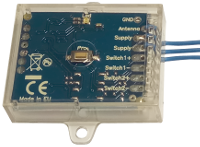
Creasol UniRec1 universal receiver can be connected to the SCS SENTINEL board ACCESS-602 to allow controlling that board by another kind of remote control, for example to use a single remote control to open more than one automation.
Connect one Power Supply wire to terminal 11
Connect the other Power Supply wire to terminal 12
Connect Switch+ to terminal 4
Connect Switch- to terminal 3
Then, program the receiver to learn one or more remote controls, and check that it works.
If it does not open the automation, exchange the connections to terminal 4 with terminal 3, and vice versa.
New and updated products
News
- Cómo hacer una caja de pared inteligente casera que funciona con Home Assistant para cargar vehículos eléctricos
- Creasol DomBusGateway: puente DomBus 2 MQTT para HomeAssistant, NodeRED, OpenHAB, ioBroker, MQTT...
- Precios y costes de la electricidad por hora en los países de la UE y previsión de la producción de energía solar fotovoltaica: script de Domoticz
- FAQ veicoli elettrici e fotovoltaico
- Instalación de una imagen optimizada de Rasbian + Domoticz en Raspberry Pi 3, Pi 4 o Pi 5.
- Integración del sistema de iluminación que utiliza relés paso a paso en Home Assistant, Domoticz, ...
- Conexión de una red de módulos DomBus a través de TCP (WiFi, Ethernet, ...) o enlace de radio inalámbrico
- Cómo construir un sistema domótico utilizando módulos DomBus
- Sugerencias: qué preparar en una casa nueva (o reformada) para poder automatizarla
- CR2032 Lithium-Manganese battey passivation layer
- Creasol DomBus and Home Assistant
- Domoticz, sistema domótico fiable, gratuito y de código abierto
How to connect UniRec1 to SCS-SENTINEL ACCESS 602 CTRL 51
Creasol UniRec1 universal receiver can be connected to the SCS SENTINEL board ACCESS-602 to allow controlling that board by another kind of remote control, for example to use a single remote control to open more than one automation.
Connect one Power Supply wire to terminal 11
Connect the other Power Supply wire to terminal 12
Connect Switch+ to terminal 4
Connect Switch- to terminal 3
Then, program the receiver to learn one or more remote controls, and check that it works.
If it does not open the automation, exchange the connections to terminal 4 with terminal 3, and vice versa.
