

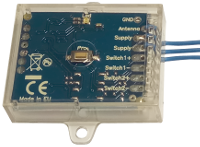
Petit appareil , 41x31x11mm, qui peut être utilisé pour ouvrir une porte principale ou une porte piétonne (avec serrure électrique) en utilisant presque toutes les télécommandes radio du marché qui émettent sur une fréquence comprise entre 220 MHz et 868 MHz, AM et FM, fixe et code roulant .
De plus, il peut recevoir sur une ou deux fréquences différentes de votre choix, même avec des modulations différentes.
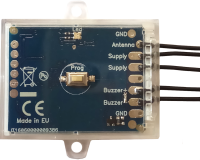
Lorsqu'un code connu est transmis par la télécommande, Creasol UniLock connecte intérieurement les deux fils d'alimentation , simulant un bouton poussoir qui laisse passer le courant vers la serrure électrique : il permet ainsi d'ouvrir une serrure électrique ou une gâche électrique en utilisant toute télécommande existante sur le marché qui a été programmée sur ce récepteur.
Il peut être utilisé avec une serrure électrique alimentée à 9÷18Vac ou 9÷24Vdc, avec un courant de 0,8 à 3,2A max.
Son installation est très simple : seulement deux fils qui doivent être connectés en parallèle au bouton poussoir existant utilisé pour activer la serrure électrique .
Pas besoin d’alimentation externe ni de batterie !
Entièrement configurable par l'utilisateur : la fréquence de fonctionnement, indiquée dans le tableau, peut être simplement programmée à l'aide du bouton Prog , ainsi que le nombre d'impulsions d'activation (1, 2, 3, 4) et leur durée (100ms, 200ms, 400ms , 600ms).
Dans le même ouvre-porte , il est possible d'apprendre jusqu'à 60 télécommandes différentes, même si elles sont de marque/modèle différent, à code fixe et à code variable, AM et FM .
Pourquoi Creasol UniLock est-il bon ?
Normalement, pour automatiser une serrure électrique, on utilise des récepteurs normaux avec 1 sortie relais, en connectant le récepteur à une alimentation 12-24V et en connectant la sortie relais au bouton-poussoir existant (utilisé pour ouvrir la porte principale/porte piétonne).
Avec UniLock, il suffit de le placer dans le boîtier mural à l'intérieur du bouton-poussoir existant, de connecter les deux fils, d'apprendre une ou plusieurs télécommandes et cela fonctionne. Pas besoin de source d'alimentation externe !
Ne pas utiliser dans des systèmes nécessitant une sécurité anti-intrusion élevée !

Exemple d'application
A l'aide de votre télécommande existante, il est possible par exemple de : 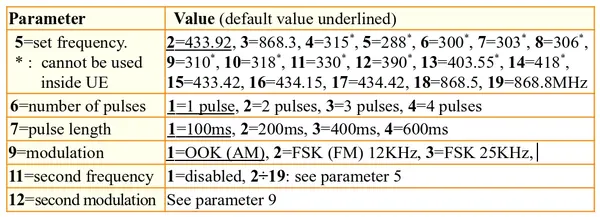
- ouvrez votre porte de garage à l'aide du bouton #1, à côté de la carte électronique et du récepteur existants ;
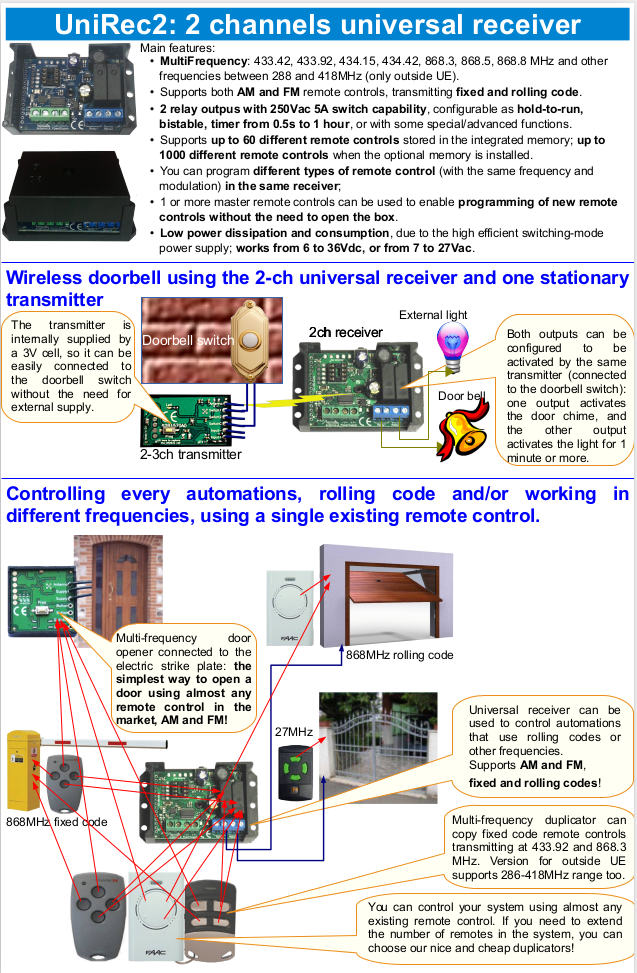
- ouvrez votre portail qui utilise une fréquence ou un codage différent, en installant simplement un récepteur Creasol Uni Rec1 ou Creasol UniRec2 qui y est connecté ;
- ouvrez votre porte/portail piéton en installant un dispositif Creasol UniLock ;
- ouvrez la porte principale de votre entrée en installant un dispositif Creasol UniLock .
Ainsi, avec votre télécommande existante, vous pouvez facilement automatiser votre maison. De plus, vous pouvez augmenter le nombre de télécommandes grâce à nos duplicateurs de télécommandes Creasol Multi , MultiST , FourST .
Le produit est fabriqué en Europe, fourni dans une coque transparente refermable et recyclable, avec des instructions imprimées en plusieurs langues.
Nous proposons également toute personnalisation aux entreprises qui souhaitent acheter au moins 100 pièces : veuillez envoyer votre demande par courrier électronique à
Caractéristiques
-
Taille très compacte : 41x31x11mm.
-
Fonctionne avec une serrure électrique alimentée de 9 à 24Vdc et de 9 à 18Vac , avec un courant de 0,8A à 3,2A
-
Fréquence sélectionnée par l'utilisateur : 433.42, 433.92, 434.15, 434.42, 868.3, 868.5, 868.8, 315 * , 288 * , 300 * , 303 * , 306* , 310 * , 318 * , 330 * , 390 * , 403,55 * , 418 * MHz. Les fréquences marquées d’un * ne peuvent pas être utilisées au sein de l’UE. La fréquence de la télécommande doit être stable, elle ne fonctionne donc pas avec des télécommandes sans cristal ni résonateur scie (certaines mauvaises télécommandes fonctionnant autour de 300 MHz) !
-
La modulation OOK (AM) et FSK (FM) est prise en charge : FM avec 2 valeurs de déviation différentes, 12,5 et 25 KHz
-
Récepteur double fréquence : l'utilisateur peut sélectionner une ou deux fréquences/modulations selon ses préférences, afin de pouvoir recevoir, par exemple, sur une seule fréquence ou à la fois 433 MHz OOK et 868 MHz FSK, ou à la fois 868 MHz OOK et 315 MHz OOK, ou toute combinaison de fréquences.
-
Fonctionne avec une large gamme de télécommandes qui transmettent un code fixe ou variable . Voir le tableau de compatibilité.
-
Gère différents types de télécommandes en même temps .
-
Il est possible d'apprendre une ou plusieurs " télécommandes principales " qui peuvent être utilisées uniquement pour permettre l'apprentissage pendant 10 secondes sans avoir besoin d'accéder au récepteur pour appuyer sur le bouton Prog .
Instructions d'installation
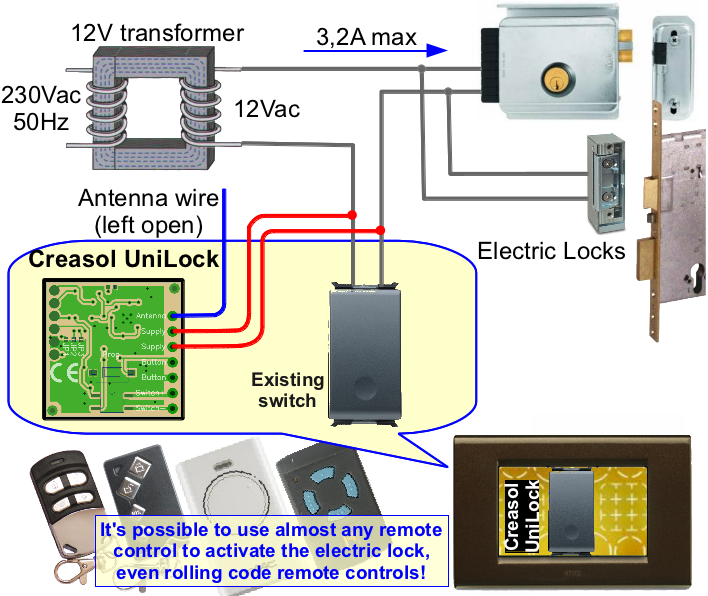
Cet appareil dispose de 3 fils, dont l'un sert d'antenne et ne doit être connecté nulle part. Deux fils doivent être connectés à l' interrupteur existant , afin qu'un peu de courant (20 mA) passe par la serrure électrique alimentant Creasol UniLock.
-
Vérifiez la tension sur l' interrupteur existant : elle doit être comprise entre 9÷24Vdc ou 9÷18Vac.
-
Mesurez le courant traversant l' interrupteur existant : il doit être compris entre 0,8÷3,2A
-
Connectez les 2 fils marqués Supply en parallèle à l' interrupteur existant .
- Configurez la fréquence que vous souhaitez utiliser en appuyant 5 fois sur le bouton Prog : la LED indique la fréquence actuellement programmée, par exemple elle clignote deux fois pour indiquer 433,92 MHz. Appuyez ensuite à nouveau N fois sur le bouton Prog , comme indiqué dans le tableau des fréquences (par exemple 3 fois pour 868,3 MHz).
- Configurez le nombre d'impulsions en appuyant 6 fois sur le bouton Prog : la LED clignote pour indiquer la configuration actuelle. Appuyez à nouveau sur le bouton Prog pour définir le numéro souhaité.
- Configurez la longueur d'impulsion en appuyant 7 fois sur le bouton Prog : la LED clignote pour indiquer la configuration actuelle. Appuyez à nouveau sur le bouton Prog pour définir la longueur souhaitée.
Apprentissage des télécommandes
Appuyez deux fois sur le bouton Prog pour activer le mode apprentissage : il est alors possible d'appuyer sur un bouton de la télécommande existante, dans les 10 secondes, pour l'apprendre. Chaque fois qu'un nouveau code est appris, le délai d'attente de 10 secondes est rechargé.
La LED clignote 2 fois si la télécommande a été apprise, 3 fois si elle a déjà été apprise, 6 fois si la mémoire est pleine.
Suppression des télécommandes
Appuyez 3 fois sur le bouton Prog , il est alors possible de transmettre, dans les 10 secondes, depuis la télécommande qui doit être retirée : la LED clignote 4 fois indiquant que la télécommande a été retirée.
Alternativement, pour vider la mémoire (supprimer toutes les télécommandes), appuyez 10 fois sur le bouton Prog , la LED clignote 10 fois, puis appuyez à nouveau 3 fois sur le bouton Prog .
Apprentissage des télécommandes « maîtres »
Appuyez 4 fois sur le bouton Prog et suivez la même procédure pour apprendre les télécommandes : dans ce cas, il est possible d'apprendre une ou plusieurs télécommandes "maîtres", qui ne peuvent être utilisées que pour activer la procédure d'apprentissage à distance, sans avoir besoin d'appuyer sur la touche Prog. Bouton Prog . Notez que les télécommandes « maître » n'activent PAS la sortie de l'ouvre-porte.
Pour apprendre de nouvelles télécommandes de cette manière, mettez la télécommande "maître" en transmission pendant 1 à 2 secondes, puis commencez à transmettre pendant 1 à 2 secondes à partir des nouvelles télécommandes : chaque fois qu'une nouvelle télécommande est apprise, les 10 s le timer est rechargé pour permettre des apprentissages successifs.
Documentation
- Instructions Creasol UniLock au format PDF
- Ancienne vidéo montrant comment utiliser Creasol UniLock

- Notes d'application qui présentent nos produits en bref et quelques exemples/schémas, au format PDF

Remote controls compatible with Creasol UniLock, Creasol UniRec1, Creasol UniRec12 and Creasol UniRec2
Cannot find your remote control in the Compatible and Incompatible tables?
Please send a message by Telegram or Whatsapp to +393283730010 including remote control pictures, brand and model.
| Company | Frequency | Models | Photo | Number of different codes that can be learned |
Frequency value (cmd=5) | Modulation (cmd=9) | Notes |
| ADYX | 433.920 | Adyx ALIZE EM2C, ALIZE EM4C |  |
1000 | 2 | 1 | |
| Adyx BRAVO TE4433H |  |
650 | 2 | 1 | |||
| ACM | 434.150 | ACM TXMEMO (memoradio) |  |
650 | 16 | 1 | |
| AETERNA | 433.920 | Aeterna TX433 1,2,4 buttons |  |
1000 | 2 | 1 | |
| ALLMATIC | 306.000 | Allmatic ASMX2, ASMX4 |  |
1000 | 8 | 1 | Transmission frequency must be accurate and stable |
| 433.920 | Allmatic AEMX1, AEMX2, AEMX4 |  |
1000 | 2 | 1 | ||
| Allmatic EUROPE AUTO ARMY1, ARMY2, ARMY4 |  |
1000 | 2 | 1 | |||
| AllmaticMX1, MX2, MX4 |  |
1000 | 2 | 1 | |||
| Allmatic BRO1WN, B.RO2WN, B.RO4WN, B.ROSTAR, B.RO ministar |  |
650 | 2 | 1 | |||
| Allmatic TECH3, BROOVER, BROSTAR |  |
650 | 2 | 1 | |||
| Allmatic PASS1, PASS2, PASS4 |  |
650 | 2 | 1 | |||
| ALLSTAR | 288.000 | Allstar Corporation Model 111025 pulsare quickcode |  |
48 | 5 | 1 | Be sure that transmission frequency is exactly 288 MHz | 8833OCS-288 |  |
48 | 5 | 1 | Be sure that transmission frequency is exactly 288 MHz |
| 9921T-288, 9921MT, 9921TK, 9922T-288, 9923T-288, 9931-288, 9931T-288, 9931MT, 9931TK, 9931TK6, 8831T-288, 8832T-288, 8833T-288,8821T-288, 8822T-288, 8823T-288, 8832TK |  |
48 | 5 | 1 | Be sure that transmission frequency is exactly 288 MHz | ||
| ALLTRONIK | 433.920 |
Alltronik S429_1, S429_2, S429_4, S429_M Be sure that your remote operates at 433.92MHz! |
  |
650 | 2 | 1 | |
| Alltronik S425 |  |
650 | 2 | 1 | |||
| ALULUX | 868.300 | Alulux 868-2, Alulux 868-4br |  |
3 | 32 | 1 | |
| ANSONIC | 433.920 | Ansonic SA 434-1E, SA434-2E, SA434-3E, SA434-4E |  |
1000 | 2 | 1 | |
| Ansonic SA 434-1MINI, SA434-2MINI, SA 434-2Midi |  |
1000 | 2 | 1 | |||
| 868.350 | Ansonic SA 868-1E, SA 868-2E, SA868-3E, SA868-4E | |
1000 | 3 | 1 | ||
| Ansonic SA 868-1mini/M, SA 868-2mini/M (dip switch version) |  |
1000 | 3 | 1 | |||
| APERTO | 433.920 | Aperto CPS1, CPS2, CPS |  |
1000 | 2 | 1 | |
| 434.420 | Aperto 4013 |  |
650 | 17 | 2 | ||
| Aperto 4022 |  |
650 | 17 | 2 | |||
| APRIMATIC | 433.920 | Aprimatic TR2, TR4 |  |
650 | 2 | 1 | |
| Aprimatic TX2M, TX4M |  |
650 | 2 | 1 | |||
| APRITECH | 433.920 | Apritech Terra Copy |  |
? | 2 | 1 | This is a duplicator: maybe some codes will not be managed by the receiver |
| Apritech Terra 433, Apritech Mars 433 | 650 | 2 | 1 | ||||
| 868.300 | Apritech Mars 868 | 650 | 3 | 1 | |||
| AVIDSEN | 433.920 | Avidsen 100601 micromark MM23164 |  |
34 | 2 | 1 | |
| Avidsen 104505 |  |
34 | 2 | 1 | |||
| Avidsen 100951, 100955, 100550, 100400 |  |
34 | 2 | 1 | |||
| Avidsen TOV 4 104700, ASTRELL, 104250, 614700 |  |
26 | 2 | 1 | |||
| BANDY | 433.920 |  |
variable | 2 | 1 | Not sure it work, because this is a duplicator: check the original remote control | |
| BELFOX | 433.920 | Belfox DHS433-1, DHS433-2, DHS433-4, dip switch version |  |
1000 | 2 | 1 | |
| Belfox DHS 433,92 (7733), dip switch version |  |
1000 | 2 | 1 | |||
| 868.350 | Belfox DHS 868,3, dipswitch version | |
1000 | 3 | 1 | ||
| Belfox HS 868-20 |  |
1000 | 3 | 1 | |||
| BENINCA' | 306.000 | Benincà LOT1A, LOT2A, LOT4A |  |
1000 | 8 | 1 | Transmission frequency must be accurate and stable |
| Benincà LOTX1A, LOTX2A, LOTX4A |  |
1000 | 8 | 1 | Transmission frequency must be accurate and stable | ||
| Benincà LO.TX2PS |  |
1000 | 8 | 1 | Transmission frequency must be accurate and stable | ||
| 433.920 | Benincà LOT1W, LOT2W, LOT4W |  |
1000 | 2 | 1 | ||
| Benincà LOT2WMS |  |
1000 | 2 | 1 | |||
| Benincà T2WK, T4WK, LO.T2WVMR, Benincà LO.T1WCV, LO.T2WCV, LO.T4WCV Benincà Cupido2 CU.2RWV, Benincà Cupido4 CU.4RWV, Benincà Rollkey |
 |
650 | 2 | 1 | |||
| Benincà LOTX1W, LOTX2W, LOTX4W |  |
1000 | 2 | 1 | |||
| Benincà TO.GO2WP, TO.GO4WP, TO.GO2WK, TO.GO4WK |  |
1000 | 2 | 1 | |||
|
Benincà IO.COLOURS, IO.GREY, TO.GO2WV, TO.GO4WV, APPLE.2, APPLE.4 |
Several images | 650 | 2 | 1 | |||
| BERNAL | 868.500 | Bernal MT87A3-2, Bernal MT87A3-4 |  |
650 | 18 | 1 | |
| Bernal MT87A1, Bernal MT87A2, Bernal MT87A4 |  |
650 | 18 | 1 | |||
| Bernal Pico 868-2, Bernal Pico 868-4, Bernal Pico III |  |
650 | 18 | 1 | |||
| ZULLAN | 315.000 | 250TXA1H, 250TXA2H, 250TXA4H |  |
||||
| BERNER | 868.300 | Berner BHS140 |  |
30 | 3 | 1 | |
| Berner BHS130 |  |
34 | 3 | 1 | |||
| BESIDE | 433.920 | Beside BEZAP |  |
1000 | 2 | 1 | |
| Beside HIT |  |
1000 | 2 | 1 | |||
| BETA ELETTRONICA | 315.000 | BETALARM 6500 |  |
1000 | 4 | 1 | Transmission frequency must be accurate and stable |
| 330.000 | BETALARM 5500 |  |
1000 | 11 | 1 | Transmission frequency must be accurate and stable | |
| BFT | 306.000 | BFT RCS |  |
1000 | 8 | 1 | Transmission frequency must be accurate and stable |
| 315.000 | BFT VTM1, VTM2, VTM4 |  |
1000 | 4 | 1 | Transmission frequency must be accurate and stable | |
| 418.000 | BFT GT01, GT02, GT04 |  |
1000 | 14 | 1 | ||
| 433.920 | BFT TE01, TE02 ( TEO1, TEO2 ) |  |
1000 | 2 | 1 | ||
| BFT TE04 ( TEO4 ) | |
1000 | 2 | 1 | |||
| BFT MITTO 2, MITTO 4, MITTO-2A, BFT MITTO-4A, MITTO-2M, MITTO-4Mi BFT MITTO4 REPLAY, BFT MITTO2 REPLAY BFT TRC 1, TRC 2, TRC 4 BFT MITTO B RCB04 R1, BFT MITTO B RCB02 R1 |
 |
650 | 2 | 1 | |||
| BOSS Openers STEEL-LINE Automation Centurion Guardian |
303.000 | BOSS HT4 6211-L 1,2 and 4 buttons, Boss BHT4, Boss HT3 blue led, Guardian 2211-L, Centurion 2211L, LYNX 2211L, MODERN 2211L 1 and 2 BUTTONs, STEEL-LINE 2211L 1, 2 and 4 BUTTON, STEEL-LINE HT3 BLUE LED, Garage Door Openers BRD1, BRD2, BRD3, BRD4, BRD9, RD1, RD2, RD3, RD4, RD9, BOL4, BOL5, BOL6, BOL9, OL4, OL5, OL6 | 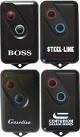 |
650 | 7 | 1 | Only versions since March 2017: ask for confirmation Transmission frequency must be accurate and stable |
| BRAVO | 433.920 | Bravo Aladin 433 |  |
? | 2 | 1 | |
| Bravo Door Passepartout |  |
2 | 1 | 433.920 868.300 |
Bravo Aladin Passepartout |  |
2 or 3 | 1 |
| BREDA | 433.920 | Breda TOP432SA |  |
1000 | 2 | 1 | |
| CAME | 315.000 | Came T312M, T314M Came TOP314M, TOP312M |
1000 | 4 | 1 | Transmission frequency must be accurate and stable | |
| Came TOP312, TOP314 |  |
1000 | 4 | 1 | |||
| Came TOP312NA, TOP314NA |  |
1000 | 4 | 1 | |||
| 433.920 | Came T432, T434 Came TOP432A, TOP434A, TOP432, TOP432NA, TOP434NA, Came Came TAM432, TAM434, TAM438 |
 |
1000 | 2 | 1 | ||
| Came TOP432M, TOP434M |  |
1000 | 2 | 1 | |||
| Came TAM432SA |  |
48 | 2 | 1 | |||
| Came TOP432SA, Came TOP434SA | |
1000 | 2 | 1 | |||
| Came TOP432NA, TOP434NA |  |
1000 | 2 | 1 | |||
| Came TWIN2, TWIN4 |  |
1000 | 2 | 1 | |||
| CAME TOP-432EE, CAME TOP434EE |  |
1000 | 2 | 1 | |||
| CAME TOP-432EV, TOP-434EV |  |
1000 | 2 | 1 | |||
| 868.350 | CAME TOP862NA, Came TOP864NA |  |
1000 | 3 | 1 | ||
| CAME TOP-862EV, Came TOP864EV | 1000 | 3 | 1 | ||||
| CARDIN | 300.000 | Cardin S300 |  |
1000 | 6 | 1 | Transmission frequency must be accurate and stable |
| 310.000 | Cardin S301, S302 | |
1000 | 9 | 1 | Transmission frequency must be accurate and stable | |
| 433.920 | Cardin S435 TX2, S435TX4, S435-TX12, TRS435200, TRS435400, TRS435400, TRS43540M Ballan S435-TX2, Ballan S435-TX4 |
 |
650 | 2 | 1 | Cardin S437 TX2 |  |
650 | 2 | 2 |
| Cardin S449 QZ1, S449-QZ2, S449-QZ3, S449-QZ4, TXQ449100, TXQ449200, TXQ449300, TXQ449400 Cardin S449 TXQ4492P0, TXQ4494P0, SSB-T9K4 Ballan S449-QZ2, Ballan S449-QZ4 |
 |
650 | 2 | 2 | |||
| Cardin S476 TX2, S476TX4, TRS476200, TRS476400 |  |
48 | 2 | 1 | |||
| 868.300 | Cardin S486 TX2, S486TX4, TXQ486100, TXQ486200, TXQ486300, TXQ486400 TXQ4862P0, TXQ4864P0, TXQ48640M, SSB-T8K4 |
|
650 | 3 | 2 | ||
| CARPER | 318.000 | Carper C318, C318T |  |
48 | 10 | 1 | Be sure that transmission frequency is set accurately |
| CASIT | 306.000 | ERTS92B, ERTS92T |  |
1000 | 8 | 1 | Transmission frequency must be accurate and stable |
| 433.920 | Casit ERTS92B, ERTS92T |  |
1000 | 2 | 1 | ||
| Casit ERTS20DB, ERTS20DQ |  |
1000 | 2 | 1 | |||
| Casit ERTS476D, ERTS476Q |  |
1000 | 2 | 1 | |||
| Casit TXS1, TXS2, TXS3, TXS4, TXS6 ERTS97B, ERTS97T |
 |
1000 | 2 | 1 | |||
| CEDAMATIC | 433.920 | Cedamatic AEMX1, AEMX2, AEMX4 | |
1000 | 2 | 1 | |
| CELINSA | 433.920 | Celinsa S10 1, S10 2, SAW1, SAW2 |  |
48 | 2 | 1 | |
| CENTURION | 433.920 | Centurion CLASSIC, SMART, SMART2 |  |
1000 | 2 | 1 | |
| CHACON | 433.920 | Chacon KCT-510 Ref. 54591, compatible with DOMIA protocol for domotic appliances Chacon LKCT-614 Ref. 54591, compatible with Home Easy protocol |
 |
48 | 2 | 1 | |
| Chacon DiO Ref. 54791 |  |
21 | 2 | 1 | |||
| Chacon LYCT-505 Ref. 54561, compatible with HOME EASY protocol for domotic appliances |  |
21 | 2 | 1 | |||
| CHAMBERLAIN LIFTMASTER MOTORLIFT SEARS CRAFTSMAN |
300.000 | Chamberlain 300MC (multicode) |  |
1 | Not still supported! | ||
| 315.000 | Liftmaster 333LM |  |
1 | Not still supported! | |||
| Liftmaster 360LM, 362LM, 363LM |  |
1 | Not still supported! | ||||
| 390.000 | Liftmaster 50CB, 53CB, 750CB, 753CB, 50LM, 53LM, 61LM, 62LM, 63LM, 139.53100, 139.53110, 139.53200, 139.53210 | |
1 | Not still supported! | |||
| LiftMaster 54CB, 756CB, 54LM, 64LM, 859CB |  |
1 | Not still supported! | ||||
| LIftmaster 850CB, 853CB, 959CB, 81LM, 82LM, 83LM, 84LM, 99LM |  |
1 | Not still supported! | ||||
| 33LM | |
1 | Not still supported! | ||||
| 418.000 | 4180, 4182, 4183 | |
1 | Not still supported! | |||
| 4185 |  |
1 | Not still supported! | ||||
|
787 remote
less entry |
 |
1 | Not still supported! | ||||
| 433.920 | 4330E, 4332E, 4333E | |
1 | Not still supported! | |||
| 4335E | |
1 | Not still supported! | ||||
| COMUNELLO | 433.920 | Comunello Keep2 RC, Comunello Keep4 RC |  |
650 | 2 | 1 | |
| 434.150 | Comunello MOWIN R1, Comunello MOWIN R6 |  |
650 | 16 | 1 | ||
| CPS | 433.920 | TCP3, CPS, Jolly 4 |  |
1000 | 2 | 1 | |
| CPS1 TCP3, CPS2 TCP3, CPS4 TCP3 EM1CV, EM2CV, EM4CV |
|
1000 | 2 | 1 | |||
| CRAWFORD | 433.920 | Crawford EA433 2K, EA433 2KM, EA433 4K |  |
650 | 2 | 1 | |
| DASPI | 433.920 | Daspi Happy2 433, Daspi Pops2 |  |
1000 | 2 | 1 | |
| Daspi Zero2, Zero2CLO, Zero4CLO |   |
1000 | 2 | 1 | |||
|
Daspi Zero2RC |
|
650 | 2 | 1 | |||
| DEA | 306.000 | Dea 306 1, 306 2, 306 4 |  |
1000 | 8 | 1 | Transmission frequency must be accurate and stable |
| Dea 306 |  |
1000 | 8 | 1 | Transmission frequency must be accurate and stable | ||
| 433.920 | Dea 433 1, 433 2, 433 4, Gold S1, Gold S2 Dea Gold 238 S1, Dea Gold 238 S2, Dea Gold 239 S4 |
 |
1000 | 2 | 1 | ||
| Dea Gold 288-R2, Dea Gold 289-R4 |  |
650 | 2 | 1 | |||
| Dea Genie 263 |  |
1000 | 2 | 1 | |||
| Dea Punto S2 |  |
1000 | 2 | 1 | |||
| Dea MIO TD2, MIO TD4 Dea Mio TRD2, Dea Mio TRD4 |
 |
1000 | 2 | 1 | |||
| Dea MIO TR2, MIO TR4 | |
650 | 2 | 1 | |||
| Dea Genie 273, | 650 | 2 | 1 | ||||
| DELMA | 300.000 | Delma Apollo 300, ELSAMEC Apollo 300 |  |
1000 | 6 | 1 | Transmission frequency must be accurate and stable |
| Delma Mizard 300 1, Mizard 300 2, King |  |
1000 | 6 | 1 | Transmission frequency must be accurate and stable | ||
| 433.920 | Delma Mizard 433 1, Mizard 433 2 |  |
1000 | 2 | 1 | ||
| Delma King 433 2 |  |
1000 | 2 | 1 | |||
| Delma Style Copy 2CH (this is a code duplicator) |  |
1000 | 2 | 1 | |||
| DICKERT | 433.920 | Dickert MAHS433 01, MAHS433 04 Note: we can NOT guarantee that it can be duplicated, because it depends by the receiver. |
 |
1 | Not still supported! | ||
| Dickert S10-433A1L00, S10-433A4L00, S20-433A1L00, S20-433A4L00, S20-433A1000, S20-433A4000 Note: only RED buttons model can be duplicated! |
 |
1000 | 2 | 1 | |||
|
Dickert S5-433-A2L00, S5U-433-A2L00 |
 |
1000 | 2 | 1 | |||
| 868.350 | Dickert HS868-21 Note: only RED buttons model can be duplicated! |
 |
1000 | 3 | 1 | ||
|
Dickert S5-868A2L00, S5U-868A2L00 |
|
1000 | 3 | 1 | |||
| Dickert S10-868A100, S10-868A400, S20-868A1L00, S20-868A4L00, S20-868A1000, S20-868A4000 Note: only RED buttons model can be duplicated! |
|
1000 | 3 | 1 | |||
| Dickert S5-868A2L01, S10-868A1L01, S10-868-A4L06, green buttons |  |
34 | 3 | 1 | Firmware Rev.03c or later | ||
| Dickert S10-868A1L01 Yellow button |  |
34 | 3 | 1 | Firmware Rev.03c or later | ||
| DIGICODE | 300.000 310.000 |
Digicode DC5010, DC5012, DC5030, DC5032, DC5040, DC5042, DC5060, DC5062, DC5070, DC5072 |  |
1000 | 6 or 9 | 1 | Transmission frequency must be accurate and stable |
| DITEC | 433.920 | Ditec GOL4C |  |
1000 | 2 | 1 | |
| Ditec GOL4, Entrematic GOL4 | |
34 | 2 | 1 | |||
|
BIX LS2, BIX LP2, BIX LG4 |
 |
34 | 2 | 1 | |||
| DOITRAND | 433.920 | MPSTF2E JAUNE, MPSTF4E, HYPERPHONE MPSTF2E_GRISE |  |
1000 | 2 | 1 | |
| TS2DE, TS4DE |  |
1000 | 2 | 1 | |||
| DOORHAN | 433,920 | Doorhan transmitter 2, Doorhan Transmitter 4 Doorhan RCBLACK-4, Doorhan ST-4 |
 |
650 | 2 | 1 | |
| DOORMATIC | 433.920 | Doormatic SAW |  |
1000 | 2 | 1 | |
|
DUCATI |
433.920 | Allducks TSAW1, TSAW2, TSAW3, TSAW4, 124 ELBER TSAW1, TSAW2, TSAW3, TSAW4 RONDY TSAW1, RONDY TSAW2, RONDY TSAW3 |
 |
1000 | 2 | 1 | |
| Allducks TPR10-A, TPR20-A RONDY TPR10_A, RONDY TPR20_A |
 |
1000 | 2 | 1 | |||
| Allducks TE2 |  |
1000 | 2 | 1 | |||
| Allducks 6203blue and transparent, with transparent buttons |
|
1000 | 2 | 1 | |||
| Allducks 6203, with blue or red buttons |  |
650 | 2 | 1 | |||
| Allducks HC6204 |  |
650 | 2 | 1 | |||
|
DÜWI |
433.920 |
Several models, handsender used for radio sockets | 1000 | 2 | 1 | ||
| EAZYMATIC | 433.920 | Eazymatic Tormax TxMini_DC/433 HS-HF 20.244 (DCL) |  |
160 | 2 | 1 | From Rev.2f |
| ELBE | 433.920 | Elbe 501, 502, 504 |  |
1000 | 2 | 1 | |
| Elbe 502a, 504a |  |
1000 | 2 | 1 | |||
| Elbe 502, 504 |  |
1000 | 2 | 1 | |||
| ELCA | 300.000 | Elca Aster 1100, Aster 1101 |  |
1000 | 6 | 1 | Transmission frequency must be accurate and stable |
| 433.920 | Elca IRIS, IRIS 9CH. Both colors red and blue Elca Iris4_433D, Elca Iris2_433D |
 |
1000 | 2 | 1 | ||
| Elca ASTER2 |  |
1000 | 2 | 1 | |||
| Elca Aster 1000, Aster1001. Colors: black, blue, light grey |
 |
1000 | 2 | 1 | |||
| Elca GEMINI 9CH, Elca Gemini2_433D, Elca Gemini4_433D |  |
1000 | 2 | 1 | |||
| Elca VIRGO |  |
1000 | 2 | 1 | |||
| Elca IRIS2_433R, Elca Gemini2_433R, Elca Gemini4_433R | |
650 | 2 | 1 | |||
|
ELDAT |
433.920 | Eldat Basewave RT20-4103M-01, RT20-4104M-01, Eldat RT20-4k, Eldat RT35-4104M-01, RT35-4k, Eldat RT21-4101M-01, RT21-4102M-01, MFZ 400033, MFZ RT20-4104M-01 |  |
2 | 1 | ||
| Eldat RT22-4139-011-01: remote control programmer |  |
2 | 1 | ||||
| Eldat Basewave RT28-4101M-01, RT27-4101M-01, RT26-4101M-02, RT21-4125M-01, RT21-4139M-01, RT21-4139M-02, RT31-4139M-01, RT31-4139M-02, RTC02-4104M-01 |  |
2 | 1 | ||||
| 868.300 | Eldat Basewave RT20-5004M-01, RT20-5003M-01, Eldat RT20-5k, Eldat RT35-5004M-01, RT35-5k, Eldat RT21-5001M-01, RT21-5002M-01, NASSAU RT20-4K | |
3 | 1 | |||
| Eldat Basewave RT28-5001M-01, RT27-5001M-01, RT26-5001M-02, RT21-5025M-01, RT21-5039M-01, RT21-5039M-02, RT31-5039M-01, RT31-5039M-02, RTC02-5004M-01 | |
3 | 1 | ||||
| Eldat Easywave RT20E5004-01-23K, RT21E5001-01-23K, RT21E5002-01-23K, RT30E5001-01-02K, RT30E5001-01-22K, RT30E5004-01-02K, RT30E5004-01-22K Eldata Easywave RT24E5001-01-01K, RT32E5001-01-02K, RT32E5001-01-22K, RT32E5004-01-02K, RT32E5004-01-22K Eldata Easywave RT34E5004-01-02K, RT34E5004-01-22K, RT34E5005-01-02K, RT34E5005-01-22K, RT34E5010-01-02K, RT34E5010-01-22K Eldata Easywave RT37E5001-01-02K, RT37E5001-01-22K, RT22E5022-01-23K |
|
650 | 3 | 3 | Work very well, Long range! | ||
| Eldat Easywave RT26E5001-12-23K, RT27E5001-11-23K, RT28E5001-11-23K, RT28E5001-11-41K | |
650 | 3 | 3 | Work very well, Long range! | ||
| Eldat Easywave RTS05E5001-01-02K, RTS05E5001-02-02K, RTS08E5002-01-02K, RTS08E5001-01-02K, RTS08E5001-01-02K Eldat Easywave RTS13E5001-01-02K, RTS13E5003-01-02K, RTS14E5002E-01-02K, RTS14E5002E-02-02K, RTS14E5003E-01-02K, RTS14E5006E-01-02K Eldat Easywave RTS14E5002E-01-02K, RTS14E5002E-02-02K, RTS14E5003E-01-02K, RTS14E5006E-01-02K Eldat Easywave RTS40E5001-01-02K, RTS40E5001-02-02K, RTS22E*, RTS23E*, RTS25E*, RTS32E*, RTS33E*, RTS34E*, RTS35E* Eldat Easywave RTS09E5002-01-02K |
 |
650 | 3 | 3 | Work very well, Long range! | ||
| Eldat Easywave RTS03E5004-01-27P, RTS03E5004-02-27P Eldat Easywave RTS17E5001-01-00K Eldat Easywave RTS39E5003-02-23K |
 |
650 | 3 | 3 | Work very well, Long range! | ||
| ELVOX | 433.920 | Elvox ET, Elvox ET2 ZT03 |  |
1000 | 2 | 1 | |
| Elvox ET03, ET04 |  |
1000 | 2 | 1 | |||
| Elvox ERT01 |  |
650 | 2 | 1 | |||
| Elvox ERT4, Elvox ETR01, Elvox ETR02, Elvox ETA1 | 650 | 2 | 1 | ||||
| 868.350 | Elvox ET08 |  |
1000 | 3 | 1 | ||
| ENIKA | 433.920 | Enika, all types: Enika Tx Cross, Enika Tx Key, Enika Tx Pocket, Enika Tx 4x8 3299-96900, Enika Tx Auto | 650 | 2 | 1 | ||
| ERONE | 433.920 | Erone SETDS39433E2, SETDS39433E4 |  |
1000 | 2 | 1 | |
| Erone SETR2641-AM2.B, SETR2641-AM2.N, SETR2641-AM2.R, SETR2641-AM2.C, SETR2641AM1, S5TR2641E2, S5TR2641E4, S2TR2641-E2M, SETR2641-TM, TSW2641E1 |  |
650 | 2 | 1 | |||
| 868.350 | Erone S2TR2681-E2, 2TR2681-E4, 2TR2681-E2M |  |
650 | 2 | 1 | ||
| ERREKA | 433.920 | Erreka LUNA, SMAT RESON 1, RESON 2, Erreka RESON 3 |   |
48 | 2 | 1 | |
| Erreka ROLLER-1, ROLLER-2, Erreka ROLL-2 JOY, Erreka Roll-4 JOY, Erreka LIRA, Erreka IRIS 2, IRIS 4 |    |
650 | 3 | 1 | |||
| 868.300 | Erreka Roller 1 868, Roller 2 868, Erreka Roller 4 868 |   |
650 | 4 | 1 | ||
| EUROPE AUTOMATISME | 306.000 | ASMY1, ASMY2, ASMY4 | |
1000 | 8 | 1 | Transmission frequency must be accurate and stable |
| 433.920 | ARMY1, ARMY2, ARMY4 | |
1000 | 2 | 1 | ||
| S1, S2, S3 |  |
1000 | 2 | 1 | |||
| FAAC | 300.000 | Faac TM300S, TM300S05 H Faac TM1 300, TM2 300, TM3 300 |
 |
34 | 6 | 1 | Transmission frequency must be accurate and stable |
| 315.000 | Faac T1, T2, T3 Faac TM1 315, TM2 315, TM3 315 |
|
34 | 4 | 1 | ||
| 330.000 | Faac TM1, TM2, TM3 Faac TM1 330, TM2 330, TM3 330 |
 |
34 | 11 | 1 | ||
| 418.000 | Faac TM1 418 DS, TM2 418 DS, TM3 418 DS | |
34 | 14 | 1 | ||
| Faac TM 418SL, TM1 418SL, TM2 418 SL, TM3 418SL | |
34 | 14 | 1 | |||
| 433.920 | Faac TM1 433 DS, TM2 433 DS, TM3 433 DS TM1 433DS DPH, TM2 433DS DPH, TM3 433DS DPH |
|
1000 | 2 | 1 | ||
| Faac Fix2, Faac Fix3, Faac Fix4 |  |
650 | 2 | 1 | |||
| Faac TML2 433 SLR, TML4 433 SLR, TML2-433-SLR, TML4-433-SLR, TML2 433 ESL, TML4 433 ESL |  |
34 | 2 | 1 | |||
| Faac TML2 433 SLP, TML4 433 SLP, TML2-433-SLP, TML4-433-SLP |  |
34 | 2 | 1 | |||
| Faac T2 433 SLH, Faac T4 433 SLH |  |
650 | 2 | 1 | |||
| Faac TE4433H |  |
650 | 2 | 1 | |||
| Faac TML2 433 SLH, TML4 433 SLH |  |
650 | 2 | 1 | |||
| Faac XT2 433 SLH, XT4 433 SLH, LR |  |
650 | 2 | 1 | |||
| 868.350 | Faac TM1 868 DS, TM2 868 DS, TM3 868 DS Faac TM1 868DS DPH, TM2 868DS DPH, TM3 868DS DPH |
 |
1000 | 3 | 1 | ||
| Faac T2 868 SLH, Faac T4 868 SLH | |
650 | 3 | 1 | |||
|
Faac TML2 868 SLH, TML4 868 SLH |
|
650 | 3 | 1 | |||
| Faac XT2 868 SLH, Faac XT4 868 SLH, LR | |
650 |
3 |
1 | |||
| Faac DL2 868 SLH, DL4 868 SLH |  |
650 | 3 | 1 | |||
|
FADINI BPT |
315.000 | ASTRO75-1, ASTRO75-2, ASTRO75-4 |  |
1000 | 4 | 1 | Transmission frequency must be accurate and stable |
| 433.920 | 433 2M, Astro43_2m |  |
1000 | 2 | 1 | ||
| Astro433-2, Astro433-4, Astro43-2, Astro43-4 |  |
1000 | 2 | 1 | |||
| Fadini JUBI 433/2, JUBI 433/4, Fadini JUBI SMALL 433/2 |  |
650 | 2 | 1 | |||
| Fadini SITI 2, Fadini SITI 4 |  |
650 | 2 | 1 | |||
| 868.350 | Fadini BIRIO 2, Fadini BIRIO 4 |  |
650 | 3 | 1 | ||
| FERPORT | 433.920 | Ferport Tac1, Tac2, Tac4, Tac1k, Tac2k, Tac4k, Tac2kr |  |
1000 | 2 | 1 | |
| FUNKMODUL ELSECO |
433.920 | Elseco T433A2K1, T433A2K2 |  |
1000 | 2 | 1 | |
| Elseco T433A2K4, T433A2K4n |  |
1000 | 2 | 1 | |||
| GAPOSA | 434.150 | Gaposa QCT1, QCT3, QCT6, QCTD, QCTAB, QCT3S, QCT34S |  |
650 | 16 | 1 | |
| GENIUS CASALI |
330.000 |  |
1000 | 11 | 1 | Transmission frequency must be accurate and stable | |
| 433.920 | Genius 433 2, Genius 433 3, Genius JA400 TM433, Genius JA401 TM433 Genius TM2433DPH, Genius TM3433DPH |
 |
1000 | 2 | 1 | ||
| Genius A252, Genius A254 Genius TRS4532C1, TRS4534C1 |
 |
650 | 2 | 1 | |||
| Genius BRAVO TE4433H | |
650 | 2 | 1 | |||
| Genius Echo TX2 RC, Genius Echo TX4 RC |  |
650 | 2 | 1 | |||
| 868.350 | Genius Amigo JA332, Genius Amigo JA334, JA332 grey, JA334 grey |  |
650 | 3 | 1 | ||
| Genius Amigold TK2868SLHDL, Genius Amigold TK4868SLHDL |  |
650 | 3 | 1 | |||
| Genius Kilo TX2 JLC, Genius Kilo TX4 JLC |  |
650 | 3 | 1 | |||
| GIBIDI | 306.000 | Gibidi TS2M |  |
1000 | 8 | 1 | Transmission frequency must be accurate and stable |
| 433.920 | Gibidi Open TMB 433, Gibidi OPEN TMQ 433, Gibidi OPEN OUT 2, Gibidi OPEN OUT 4 Gibidi Open/2 TM/B, Gibidi Open/4 TM/B |
 |
1000 | 2 | 1 | ||
| Gibidi Domino4 AU 03000 - DTS4334, AU1600, AU1610, AU1680, AU1680 wood, AU1810 Gibidi Roller2-AU1600, GIBIDI Roller AU01590, GIBIDI Roller AU01680 |
 |
650 | 2 | 1 | |||
| GILGEN | 433.920 | Gilgen F7000/S4, Gilgen F7000/S2 | |
34 | 2 | 1 | |
| GOBBATO | 306.000 | Gobbato T306 |  |
1000 | 8 | 1 | Transmission frequency must be accurate and stable |
| 433.920 | Gobbato TRA3S, Gobbato TRA433P, Gobbato TRA433 |  |
650 | 2 | 1 | ||
| GRIFFON | 403.55 | Griffon 404 MHz dip switch remotes and duplicating remotes |  |
1000 | 13 | 1 | |
| 433.92 | Griffon 433 MHz dip switch remotes and duplicating remotes | |
1000 | 2 | 1 | ||
| GTO | 318.000 | GTO Mighty Mule 1/2 buttons, RB741, RB742 |  |
1 | Not still supported! | ||
| GTO Mighty Mule 3 buttons, RB743 |  |
1 | Not still supported! | ||||
| GULLIVER | 306.000 | Gulliver MD/1, Gulliver MD/1, Gulliver MDRQ 306 LABEL |  |
1000 | 8 | 1 | Transmission frequency must be accurate and stable |
| 433.920 | MDW 2E |  |
1000 | 2 | 1 | ||
| HAUSS | 433.920 | Pocket 3750-1, Pocket3750-2, Pocket 3750-4 |  |
1000 | 2 | 1 | |
| HEDDOF | 318.000 | P219-1, P219-2 |  |
1 | Not still supported! | ||
| P220-1, P220-2, P220-3 |  |
1 | Not still supported! | ||||
| HORMANN HOERMANN |
433.920 |
Hormann HSM2, HSM4, yellow buttons |
 |
30 | 2 | 1 | |
| 868.300 | Hoermann HS1, HS2, HS4, blue buttons |
|
30 | 3 | 1 | ||
| Hormann HSD2 |  |
30 | 3 | 1 | |||
| Hoermann HSE2, HSE4, blue buttons |  |
30 | 3 | 1 | |||
| Hoermann HSM2, HSM4, blue buttons |  |
30 | 3 | 1 | |||
| Hormann HSP4, blue buttons |  |
30 | 3 | 1 | |||
| Hoermann HSS2, HSS4, blue buttons |  |
30 | 3 | 1 | |||
| Hormann HSZ1-868, HSZ2-868 |  |
30 | 3 | 1 | |||
| HRC | 433.920 | 1000 | 2 | 1 | |||
| ITALFILE | 433.920 | Italfile JANE-F 433MHz |  |
2 | 1 | This is a duplicator: maybe some codes cannot be copied | 433.920 868.300 |
Italfile JANE-V Multifrequenza | |
2 or 3 | 1 | This is a duplicator: maybe some codes cannot be copied |
| JAY | 433.920 | Jay UBEI x1 SL1 |  |
1000 | 2 | 1 | |
| Jay UBET 11, UBET 21, UBET 31, UBET 41, UBET 61Â |  |
1000 | 2 | 1 | |||
| KEY AUTOMATION | 433.920 | Key Automation 900TXB-42, 900TXB-42N, 900TXP-42, 900TXP-42N |  |
1000 | 2 | 1 | |
| key 900TXB-44, 900TXG-44 |  |
1000 | 2 | 1 | |||
| key automation 900SUB-44, 900SUB-44N, 900SUB-44W, 900SUB-44WN |  |
1000 | 2 | 1 | |||
| key 900TXK-42, 900TXW-42,900TXK-44, 900TXW-44 |  |
1000 | 2 | 1 | |||
| Key automation TXB-42R, TXP-42R Key TXG-42R, TXG-44R, TXB-42R, TXB-44R Key automation SUB-44R Key TXW-42R, TXW-44R, TXK-42R, TXK-44R |
|
650 | 2 | 1 | |||
| KING | 433.920 | 1 | Not yet supported! | ||||
| LABEL IUPPITER |
306.000 | Label MDR, IUPPITER 306 |  |
1000 | 8 | 1 | Transmission frequency must be accurate and stable |
| 433.920 | Label RJW/1E, RJW/2E, RJW/4E, RJW/12E |  |
1000 | 2 | 1 | ||
| Label MDW/1E, MDW/2E | |
1000 | 2 | 1 | |||
| Label SPYCO1/E, SPYCO2, SPYCO3 |  |
650 | 2 | 1 | |||
| LEB | 306.000 | Leb TSA4 |  |
1000 | 8 | 1 | Transmission frequency must be accurate and stable |
| 433.920 | Leb TMW |  |
1000 | 2 | 1 | ||
| Leb TSAW2N, TSAW4N |  |
1000 | 2 | 1 | |||
| Leb TCP3 (this is a code duplicator) |  |
Variable | 2 | 1 | Not sure it work, because this is a duplicator: check the original remote control | ||
| Leb TRK4 |  |
1000 | 2 | 1 | |||
| Leb TPW4 |  |
1000 | 2 | 1 | |||
| 868.300 | Leb TPK4 | |
1000 | 3 | 1 | ||
| LEGRAND | 433.920 | Legrand CAD 48900, 48901, 48903. Legrand CAD 48906, 48910, 48912 |
 |
48 | 2 | 1 | |
| LINCE | 433.920 | Lince LR 2035 | 1000 | 2 | 1 | ||
| LINEAR |
300.000 |
Linear MULTI-CODE 308911, 308913, 1089 |  |
1000 | 6 or 9 | 1 | Transmission frequency must be accurate and stable |
| Linear MULTI-CODE 412001, 414001, 109410, 109710 |  |
1000 | 6 or 9 | 1 | Transmission frequency must be accurate and stable | ||
| Linear MULTICODE 306010, 307010, 108210 |  |
1000 | 6 or 9 | 1 | Transmission frequency must be accurate and stable | ||
| Linear MULTI-CODE 308301, 308302 |  |
1000 | 6 or 9 | 1 | Transmission frequency must be accurate and stable | ||
| Linear MULTICODE 105015 |  |
1000 | 6 or 9 | 1 | Transmission frequency must be accurate and stable | ||
| 310.000 | Linear Delta3 Moore-o-Matic: DT, DT2, DT2A, DT22A, DTC, DTD |  |
1000 | 9 | 1 | Not still supported! | |
| Linear Delta 3 Moore-o-Matic: DT3, DT4 |  |
1000 | 9 | 1 | Not still supported! | ||
| Delta 3 Moore-o-Matic: Mini-T LB "LadyBug" |  |
1000 | 9 | 1 | Not still supported! | ||
| 312.000 | Delta3 DTK (canada) | |
1 | Not supported | |||
| LUTEC | 433.920 | Lutec TRC2, Lutec TRC4 | 650 | 2 | 1 | ||
| MA SYSTEM | 433.920 | MA TX1, MA TX2, MA TX3 |  |
1000 | 2 | 1 | |
| MARANTEC TECKENTRUP |
315.000 | Marantec M3-2312, Marantec M3-3313 | |
34 | 4 | 1 | |
| 418.000 | Marantec D212, D222, D232 |  |
34 | 14 | 1 | ||
| 433.920 | Marantec D101 |  |
1000 | 2 | 1 | ||
| Marantec D12 |  |
1000 | 2 | 1 | |||
| Marantec D212, D222, D232 | |
1000 | 2 | 1 | |||
| Marantec Digital 302, D302 | |
34 | 2 | 1 | |||
| Marantec Digital 304, D304 |  |
34 | 2 | 1 | |||
| 868.300 | Marantec Digital 302, D302 | |
34 | 3 | 1 | ||
| Marantec Digital 304, D304 | |
34 | 3 | 1 | |||
| MCZ | 433.920 | MCZ Aster |  |
1000 | 2 | 1 | |
| MEIßNER MEISSNER |
433.920 | LW433-1, LW433-2, LW433-4 |  |
1000 | 2 | 1 | |
| Pocket 3750 1, 2, 4 | |
1000 | 2 | 1 | |||
| MONSEIGNEUR | 433.920 | ARC2, ARC4 |  |
1000 | 2 | 1 | |
| TDR 400 3845, TDR 400 3846, TDR 400 3847 T1SAW433, T2SAW433, T4SAW433 |
 |
1000 | 2 | 1 | |||
|
MOTORLINE |
433.920 | MX1, MX2, MX3, MX4, MX6 MX11, MX12, MX13 |
 |
1000 | 2 | 1 | |
| MOTOSTAR | 433.920 | CLIKSTAR2, CLICKSTAR4 CLICK-4M, CLICKSTAR RE 532, CLICKSTAR RE 534 |
 |
1000 | 2 | 1 | |
| NICE | 306.000 | Nice EASY S1, S2, S4 |  |
1000 | 8 | 1 | Transmission frequency must be accurate and stable |
| 433.920 | Nice FLO1, FLO2, FLO4 |  |
1000 | 2 | 1 | ||
| Nice VERY VE |  |
1000 | 2 | 1 | |||
| Nice SMILO SM2, SM4, black or blue |  |
650 | 2 | 1 | |||
| NOLOGO | 306.000 |  |
1000 | 8 | 1 | Transmission frequency must be accurate and stable | |
| 433.920 | ECO DIP |  |
1000 | 2 | 1 | ||
| NORMSTAHL | 433.920 | Normstahl EA433 2K, Normstahl EA433 2KM, Normstahl EA433 4K | |
650 | 2 | 1 | |
| Normstahl RCU 433 2K, Normstahl RCU 433 4K |  |
650 | 2 | 1 | |||
| NOVOTECNICA | 306.000 | BIT N1, BIT N2 |  |
1000 | 8 | 1 | Transmission frequency must be accurate and stable |
| BIT NT1, BIT NT2, BIT NT4 |  |
1000 | 2 | 1 | |||
| 433.920 | Novotecnica BIX L2, BixL2 |  |
650 | 2 | 1 | ||
| OG | 433.920 | OG62, OG64 |  |
34 | 2 | 1 | |
| O&O OeO O and O |
360.000 | OeO TX2, OeO TX4 (green buttons) |  |
1000 | 8 | 1 | Transmission frequency must be accurate and stable |
| 433.920 | OeO TX2-E, OeO TX4-E (red buttons) | |
1000 | 3 | 1 | ||
| O&O T-COM DS 4-2, T-COM DS 4-4 |  |
1000 | 2 | 1 | |||
| OeO T-COM R4-2, O&O TCOM R4-4 |  |
650 | 2 | 1 | |||
| OeO ELIOT 2 - R4, O&O ELIOT 4 - R4 |  |
650 | 2 | 1 | |||
| O&O Ray2 |  |
650 | 2 | 1 | |||
| 868.350 | OeO T-COM R8-2, O&O TCOM R8-4 |  |
650 | 3 | 1 | ||
| OPENOUT | 306.000 | TS2M |  |
1000 | 8 | 1 | Transmission frequency must be accurate and stable |
| 433.920 | TMQ 433 2, TMQ 433 4 |  |
1000 | 2 | 1 | ||
| PIAZZETTA | 433.920 | 4 buttons for wood/pellet heater Piazzetta |  |
1000 | 2 | 1 | |
| PORTAMATIC | 433.920 | MPH01, MPH02 |  |
1000 | 2 | 1 | |
|
POWERFIX Profi |
433.920 | Powerfix Profi RCB-A 3600R (Lidl) |  |
1000 | 2 | 1 | |
| PRASTEL | 306.000 | Prastel NCSMT1, NCSMT2P, NCSMT4P |  |
1000 | 8 | 1 | Transmission frequency must be accurate and stable |
| Prastel KMFT2P, KMFT4P, KMFT2P93, KMFT4P93 |  |
1000 | 8 | 1 | Transmission frequency must be accurate and stable | ||
| 433.920 | Prastel MPSTF2E, MPSTF4E |  |
34 | 2 | 1 | ||
| Prastel MPSTL2E, MPSTL4E |  |
34 | 2 | 1 | |||
| Prastel BFOR, Prastel MPSTP2E, Prastel MPSTP4E | |
650 | 2 | 1 | |||
| PROEM | 433.920 | Proem ER2C4ACM, ER4C4ACM |  |
1000 | 2 | 1 | |
| PROGET | 433.920 | Proget ETY_433N2, ETY 433N4 |  |
1000 | 2 | 1 | |
| Proget EMY433-N2, Proget EMY 2N, Proget EMY 4N |  |
1000 | 2 | 1 | |||
| PROTECO | 433.920 | Proteco TX433 |  |
1000 | 2 | 1 | |
| Proteco EUROMATIC |  |
1000 | 2 | 1 | |||
| Proteco HIT |  |
1000 | 2 | 1 | |||
| PUJOL | 288.000 | JCM TRINARIO 1, TRINARIO 2, TRINARIO 3 |  |
1000 | 5 | 1 | Transmission frequency must be accurate and stable |
| Pujol TT1, TT2, TRINARIO 1, TRINARIO 2 |  |
1000 | 5 | 1 | Transmission frequency must be accurate and stable | ||
| 433.920 | Pujol P215/2 Vario, Pujol P215/4 Vario |  |
650 | 2 | 1 | ||
| Pujol Vario 433-1, Pujol Vario2 433-2, Pujol Vario3 433-3 |  |
650 | 2 | 1 | |||
| PULSAR | 318.000 | 9931-318, 9931T-318 | |
1 | Not still supported! | ||
| QUICK | 433.920 | Quick Gangway transmitter. Marine remote control for yacht. Quick Télécommande pour Passerelle Mando a distancia marinas para pasarela Radiocomando QUICK per passerelle su yacht. |
 |
34 | 2 | 1 | |
| Quick Pocket Model 02, Quick Pocket Model 04 |  |
34 | 2 | 1 | |||
| ROGER | 433.920 | Roger R80/TX12, R80/TX14, R80/TX12R, R80/TX14R |  |
650 | 2 | 1 | |
| Roger H80/TX22 |  |
650 | 2 | 1 | |||
| G80/TX32, G80/TX34, G80/TX32R, G80/TX34R |  |
650 | 2 | 1 | |||
| SCS Sentinel | 433.920 | SCS Sentinel AAM0113 |  |
1000 | 2 | 1 | |
| SEA | 433.920 | SEA TXS |  |
1000 | 2 | 1 | |
| Sea SMART433_TX2, SMART433_TX3 SMART433_TX2_COPY,SMART433_TX3_COPY Smart2, Smart3 |
 |
1000 | 2 | 1 | |||
| 868.350 | Sea 231103, SEA868_4 |  |
1000 | 3 | 1 | ||
| Sea 231103, Head2 Dip Switch |  |
1000 | 3 | 1 | |||
| Sea SMART868-TX2, SMART868-TX3 Smart2, Smart3 |
|
1000 | 3 | 1 | |||
| SEAV | 306/330 | Seav TX1, TX2, TX3, TX4, TX1/330 Seav TX2/330, TX3/330, TX4/330 |
 |
1000 | 8 | 1 | Transmission frequency must be accurate and stable |
| 433.920 | Seav TXS1, TXS2, TXS3, TXS4 | |
1000 | 2 | 1 | ||
| Seav Behappy S1, Behappy S2, Behappy S3 | |
1000 | 2 | 1 | |||
| Seav Behappy RS1, Seav Behappy RS2, Seav Behappy RS3 | |
650 | 2 | 1 | |||
| Seav Be Easy TX, Be Easy Murale2 |  |
1000 | 2 | 1 | |||
| Seav BeSmart S2, BeSmart S4 |  |
1000 | 2 | 1 | |||
| Seav BeFree S1 |  |
1000 | 2 | 1 | |||
| 868.300 | Seav BeSmart H2, BeSmart H4 | |
1000 | 3 | 1 | ||
| Seav BeFree H1 | |
1000 | 3 | 1 | |||
| SECURVERA | 433.920 | SV R2C |  |
1000 | 2 | 1 | |
| SV R2C |  |
1000 | 2 | 1 | |||
| SV R4C |  |
1000 | 2 | 1 | |||
| SV R6C |  |
1000 | 2 | 1 | |||
| SENDER | 433.920 |  |
1000 | 2 | 1 | ||
|
SENTRY MARTIN ELECTRONICS |
403.550 | SENTRY binary, SENTRY trinary |  |
1000 | 13 | 1 | |
| 433.920 | SENTRY binary |  |
1000 | 2 | 1 | ||
| SERAI | 310.000 | Serai OG/32 |  |
34 | 9 | 1 | Transmission frequency must be accurate and stable |
| 433.920 | Serai OG/52, Serai OG/54, Serai OG/82, Serai OG/84 |  |
34 | 2 | 1 | ||
| Serai OG/28, Serai OG/48, Serai OG/62, Serai OG/64 |  |
34 | 2 | 1 | |||
| Serai OG/02, Serai OG/04 |  |
34 | 2 | 1 | |||
| SICE | 433.920 | TX4 CLACK Bigfoot |  |
1 | Not supported! | ||
| SILVELOX - INTRA | 306.000 | Green case with black buttons | |
1000 | 8 | 1 | Transmission frequency must be accurate and stable |
| 433.920 | Silvelox Intra HSM4 | |
30 | 2 | 1 | ||
| Silvelox Eco TSM2 |  |
650 | 2 | 1 | |||
| Silvelox Silv466 |  |
650 | 2 | 1 | |||
| SIMBA | 433.920 | Simba RC1, Simba RC4 |  |
1000 | 2 | 1 | |
| SIMINOR | 433.920 | ER2C4ACM, ER4C4ACM, ER2C4ACS, ER4C4ACS | |
1000 | 2 | 1 | |
| SIMU | 433.920 | Simu TSC4 |  |
34 | 2 | 1 | |
| SKYLINK |
300.000 |
MultiLink SD300M, Skylink 100, LD310M, SD310M |  |
1000 | 6 or 9 | 1 | Transmission frequency must be accurate and stable |
| 318.000 | Skylink Mltilink PD-318M |  |
1 | Not still supported! | |||
| 390.000 | Multilink CB-390M, CD-390M (versions compatible with Chamberlain) |
 |
1 | Not still supported! | |||
| SMD | 433.920 | LW433-1, LW433-2, LW433-4 : AM models only | |
1000 | 2 | 1 | |
| SOMFY | 433.920 | Somfy LEB TMW |  |
1000 | 2 | 1 | |
| Somfy S433-2T, Somfy S433-4T, Somfy 433NL, Somfy Mitto RTR, |  |
650 | 2 | 1 | |||
| SOMMER | 434.420 | Sommer 4013 TX03-434-4, Sommer 4014V TX03-434-2, Ballan 4013 (GREEN/YELLOW LED) | |
650 | 17 | 2 | |
| Sommer 4022 (GREEN/YELLOW LED) | |
650 | 17 | 2 | 868.800 | Sommer 4020 TX03-868-4, Sommer 4026V TX03-868-2 (RED LED) |  |
650 | 19 | 2 |
| Sommer 4025, Sommer 4025-BLUE (RED LED) |  |
650 | 19 | 2 | |||
| Sommer 4010, Sommer 4011, Sommer 4031 (RED LED) |  |
650 | 19 | 2 | |||
| STAGNOLI | 433.920 | Stagnoli ZEUS AZ442 |  |
1000 | 2 | 1 | |
| Stagnoli Venus AV222 |  |
1000 | 2 | 1 | |||
| Stagnoli Kallisto AK442 |  |
650 | 2 | 1 | |||
| Stagnoli Venus AV221, Stagnoli Venus AV223 |  |
650 | 2 | 1 | |||
| Stagnoli Kallisto AK441, Stagnoli Kallisto AK443 |  |
650 | 2 | 1 | |||
| ZEUS AZTR | |
1000 | 2 | 1 | |||
| 868.350 | ZEUS AZTR | |
1000 | 3 | 1 | ||
| STANLEY | 310.000 | 24286 |  |
1000 | 9 | 1 | Transmission frequency must be accurate and stable |
| 1082 | |
1000 | 9 | 1 | Transmission frequency must be accurate and stable | ||
| 1050 | |
1000 | 9 | 1 | Transmission frequency must be accurate and stable | ||
| 1094 |  |
1000 | 9 | 1 | Transmission frequency must be accurate and stable | ||
| 1097 |  |
1000 | 9 | 1 | Transmission frequency must be accurate and stable | ||
| STARTEC | 433.920 | TXQ2 |  |
1000 | 2 | 1 | |
| STINGER | 300.000 310.000 318.000 390.000 |
300MCD21V, 300MCD22V 310MCD21V, 310LID21V, 310LID22V 318ALD31V 390LMD21V, 390LMPB1V |
 diff. colors |
1 | This is a compatible remote control: please look for the compatibility of the original retmotes! | Superior Electronics | 433.920 | Simple2, Simple4 |  |
650 | 2 | 1 |
| TAU | 315.000 | Tau 250 TXA2H, 250 TXA4H | |
1000 | 4 | 1 | Transmission frequency must be accurate and stable |
| 433.920 | Tau 250 SLIM, 250K-SLIM, 250K-SLIMC |  |
1000 | 2 | 1 | ||
| Tau 250 SLIM-SLIMP | |
650 | 2 | 1 | |||
| Tau 250TXD2, Tau 250TXD4 |  |
1000 | 2 | 1 | |||
| Tau 250BUG2, 250BUG4 |  |
1000 | 2 | 1 | |||
| Tau 250BUG2_R, 250BUG4_R | |
650 | 2 | 1 | |||
| Tau 250T-4, 250T-4C |  |
1000 | 2 | 1 | |||
| Tau 250T-4RP | |
650 | 2 | 1 | |||
| TEC KEY | 300.000 | MK1010 |  |
1000 | 6 | 1 | Transmission frequency must be accurate and stable |
| TECNOMATIC | 433.920 | Tecnomatic TQ433 |  |
1000 | 2 | 1 | |
| TEDSEN BERNER GFA Elektromaten |
433.920 | SKX1MD, SKX2MD, SKX3MD, SKX4MD |  |
1000 | 2 | 1 | |
| SKX1KD, SKX2KD, SKX4KD, SKX6KD |  |
1000 | 2 | 1 | |||
| SKX1DL, SKX2DL, SKX3DL, SKX4DL |  |
1000 | 2 | 1 | |||
| SKX1LC, SKX2LC, SKX3LC, SKX4LC |  |
1000 | 2 | 1 | |||
| SKX1SL, SKX2SL, SKX3SL, SKX4SL |  |
1000 | 2 | 1 | |||
| SKJ |  |
1000 | 2 | 1 | |||
| SKX1WD, SKX2WD, SKX4WD, SKX11WD, SKX22WD, SKX44WD |  |
1000 | 2 | 1 | |||
| TELCOMA QUASAR |
306.000 | RCST2, RCST4 |  |
650 | 8 | 1 | Transmission frequency must be accurate and stable |
| 433.920 | TELCOMA EDGE 2, TELCOMA EDGE 4 |  |
650 | 2 | 1 | ||
| TELCOMA TANGO 2 SW, TANGO4 SW |   |
650 | 2 | 1 | |||
| TANGO BLUE 2, TANGO 4 BLUE, TANGO BLEU 2, TANGO BLEU 4 |  |
650 | 2 | 1 | |||
| TANGO 2 N, TANGO 4 N |  |
650 | 2 | 1 | |||
| TANGO 2 SLIM, TANGO 4 SLIM |  |
650 | 2 | 1 | |||
| Telcoma Noire2, Noire4 |
 |
34 | 2 | 1 | |||
| TANGO WIN3 |  |
650 | 2 | 1 | |||
| TANGO2, TANGO4 |  |
650 | 2 | 1 | TELCOMA FM402E, Telcoma FM404E, Telcoma FM420, Telcoma FM400 TAXI Ballan FM402E, Ballan FM404E |
|
650 | 2 | 2 |
| TELECO | 433.920 | Teleco TXP433A01 Teleco TXR434A02 Teleco TXR433A01, TXR433A02, TXR433A04 Teleco TXW433A02, TXW433A04 Teleco TXK433A04 |
  |
650 | 2 | 1 | |
| TELEMATIC | 300.000 | TL1, TL2 |  |
1000 | 6 | 1 | Transmission frequency must be accurate and stable |
| TKC | 433.920 | TSAW433 |  |
1000 | 2 | 1 | |
| TMT Automation | 433.920 | PR2, PR4 | 650 | 2 | 1 | ||
| TORAG | 433.920 | S429 1, S429 2, S429 4 | |
1000 | 2 | 1 | |
| TORMATIC DORMA NOVOFERM |
433.920 | HS, Dorma HS43 1E, HS43 2E, HS43 3E, HS43 4E |  |
1000 | 2 | 1 | |
| MAHS, Siebau, Novoferm, Dorma |  |
1000 | 2 | 1 | |||
| MHS, MHS43-1 |  |
1000 | 2 | 1 | |||
| Tormatic Novoferm Novotron 502 Tormatic Novoferm Novotron 504 MCHS43, MNHS433-02, MNHS433-04 |
  |
650 | 2 | 1 | |||
| TORMAX | 433.920 | Tormax TxMini_DC/433 HS-HF 20.244 (DCL) | |
160 | 2 | 1 | From Rev.2f |
| TOUSEK | 433.920 | Tousek RS433 rolling code |  |
666 | 2 | 1 | |
| 868.300 | Tousek RS868 rolling code | |
666 | 3 | 2 | ||
| TREMA | 433.920 | TO93TV1, TO93TV2, TO93TV4 |  |
1000 | 2 | 1 | |
| TRESOR | 433.920 | TRESOR4 chinese remote control duplicator |  |
2 | 1 | ||
| TUBAUTO | 433.920 | DIGITAL 101 433 | |
1000 | 2 | 1 | |
| V2 | 306.000 | V2 TRR1_306 |  |
1000 | 8 | 1 | Transmission frequency must be accurate and stable |
| 318.000 | V2 TPS1K |  |
1000 | 10 | 1 | Transmission frequency must be accurate and stable | |
| 433.920 | V2 MATCH white, V2 MATCH black |  |
20÷60 | 2 | 1 | This is a duplicator, so it is not possible to know exactly the transmitting code, but factory programmed code and almost any code supported by this duplicator is also supported by our receivers | V2 PHOENIX series: Phoenix2, Phoenix2P, Phoenix4, Phoenix4P, TXC2 Contr.*, TXC4 Contr.*, TRC4 Contr. *, TXC2 Contr.47, TXC4 Contr.47, Handy2 Contr.47, Handy4 Contr.47, TRC4 Contr.47, TSC4 Contr.47, TRC4 Contr.92., DIMOEL TRC4 |     |
34 | 2 | 1 |
| V2 TCP3 | |
1000 | 2 | 1 | |||
| V2 TCP3, ARC3 | |
1000 | 2 | 1 | |||
| V2 TCP3 |  |
1000 | 2 | 1 | |||
| V2 TPR |  |
1000 | 2 | 1 | |||
| V2 T1SAW/433, T2SAW/433, T4SAW/433 |  |
1000 | 2 | 1 | |||
| V2 TRR1, TRR2, TRR4 |  |
1000 | 2 | 1 | |||
| V2 PMR2, PMR4 |  |
1000 | 2 | 1 | |||
| 868.300 | V2 PHOENIX series: Phoenix2-868, Phoenix2P-868, Phoenix4-868, Phoenix4P-868. |
 |
34 | 3 | 1 | ||
| VISONIC | 315.000 | Visonic WT100, WT100A, WT101, WT101A, WT102, WT104,WT-201, WT-201A, WT-201WP, WT-201AWP |    |
1000 | 4 | 1 | |
| 418.000 | Visonic WT-100, WT-100A, WT-101, WT-101A, WT-102, WT-104,WT-201, WT-201A, WT-201WP, WT-201AWP | 1000 | 14 | 1 | |||
| 433.920 | Visonic WT 100, WT 100A, WT 101, WT 101A, WT 102, WT 104,WT 201, WT 201A, WT 201WP, WT 201AWP | 1000 | 2 | 1 | |||
| Visonic MCT-234, Visonic MCM-140 | 650 | 2 | 1 | ||||
| VSEG | 433.920 | CR SLIM |  |
1000 | 2 | 1 | |
| WAYNE-DALTON | 433.920 | Wayne Dalton S429-1, S429-2, S429-4, S429-mini | |
48 | 2 | 1 | |
| Wayne Dalton S425 | |
48 | 2 | 1 | |||
| Wayne Dalton E4F |  |
650 | 2 | 1 | |||
| 868.800 | Wayne-Dalton 4020 TX03-868-4 | |
650 | 19 | 2 | ||
| WECLA CDS |
433.920 | Wecla 433, Wecla 433_2, CDS 433, CDS 433_2 |  |
1000 | 2 | 1 | |
| WELLER | 868.500 | Weller MT87A3-2, Weller MT87A3-4 | |
650 | 18 | 1 | |
| Weller MT87A1, Weller MT87A2, Weller MT87A4 | |
650 | 18 | 1 | |||
| ZULLAN | 315.000 | 250TXA1H, 250TXA2H, 250TXA4H | |
1000 | 4 | 1 | Transmission frequency must be accurate and stable |
| OEM | 315.000 |
|
 |
1000 | 4 | 1 | Transmission frequency must be accurate and stable |


Additional information:
Transmission frequency must be accurate and stable: it means that the original remote controls has a transmitter circuitry which frequency may be NOT accurate. Because the universal receiver has a good selectivity (narrow bandwidth), it may not work with bad transmitters that are not stable in frequency, while it works well with our remote control duplicators MULTI, MULTI-ST, FOUR, SENDER, SENDERBATT.
Cannot find your remote control in the Compatible and Incompatible tables?
Please send a message by Telegram or Whatsapp to +393283730010 including remote control pictures, brand and model.
ChangeLog2019-12-20Added parameter 13 that can be used to limit the receiver sensitivity: it can be used to prevent that distant remote controls from operating the receiver0 ⇒ no attenuation 1 ⇒ 6dB attenuation 2 ⇒ 12dB attenuation 3 ⇒ 18dB attenuation 2017-04-18
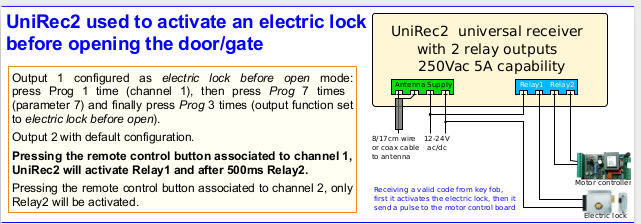
2015-04-03Now it's possible to do a factory reset pushing Prog button 10 times, then pushing 4 times. (Thanks Thanos)2015-01-14UniRec1: added menu 7 to configure the output as: 1=normally open (default); 2=normally closedUniRec2: added menu 7 to configure the relay outputs as: 1=normally open (default); 2=normally closed; 3=electric lock before open (when a valid code is received, the output will be activated and after 250ms even the other output will be activated. This is useful when an electric lock should be activated before activating the motor that opens the door/gate); 4=off before on (before activating the output, the other output should be disabled. This is useful to directly control the two phases of an AC motor, to drive it forward and reverse. | ||||||||||||||||||||
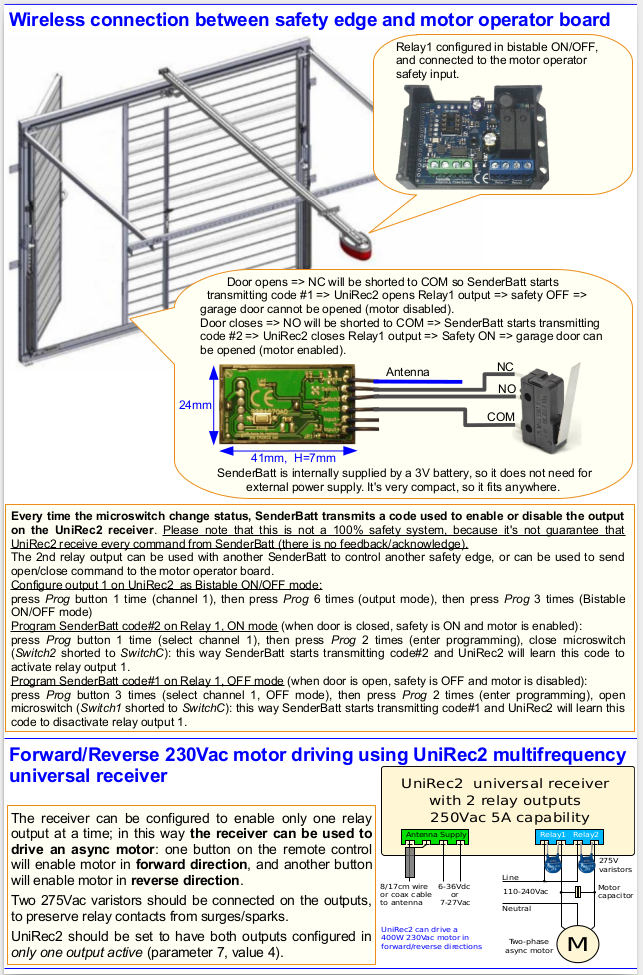
Some application notes about our receivers
Frequency Asked Questions - FAQ
- Can I program receiver in two different frequencies?
For example you can configure receiver to works with both 433.92MHz OOK fixed code remote control (default configuration) and 868.8MHz FSK rolling code remote control SOMMER.
To do this, you have to configure:
- set 2nd frequency to 868.8MHz: push button 11 times (second frequency), wait for led flashing, then push button 17 times (434.42 MHz), wait for led flashing.
- set 2nd modulation to FSK: push button 12 times, wait for led flashing, then push button 3 times (FSK 25KHz deviation)
- learn both remote controls on channel 1: push button 1 time: wait for led goes steady ON, push button 2 times (to activate learning): led starts flashing slowly. Within 5 seconds start transmitting from the original remote control: led should flash 2 times (remote control learned) or 3 times (remote control was already learned). Then, within 5 seconds, push button on the second remote controls to learn the second one, and so on...
