

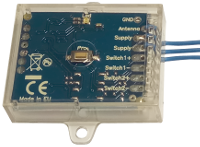
Creasol UniRec1 universal receiver can be connected to the SCS SENTINEL board ACCESS-602 to allow controlling that board by another kind of remote control, for example to use a single remote control to open more than one automation.
Connect one Power Supply wire to terminal 11
Connect the other Power Supply wire to terminal 12
Connect Switch+ to terminal 4
Connect Switch- to terminal 3
Then, program the receiver to learn one or more remote controls, and check that it works.
If it does not open the automation, exchange the connections to terminal 4 with terminal 3, and vice versa.
New and updated products
News
- Eine selbstgemachte, intelligente Wallbox bauen, die mit dem Home Assistant funktioniert, um Elektrofahrzeuge aufzuladen
- Creasol DomBusGateway: DomBus 2 MQTT-Bridge für HomeAssistant, NodeRED, OpenHAB, ioBroker, MQTT ...
- Stündliche Strompreise und -kosten für EU-Länder sowie Prognose zur Solarstromerzeugung: Domoticz-Skript
- FAQ veicoli elettrici e fotovoltaico
- Installation eines optimierten Raspbian + Domoticz-Images auf Raspberry Pi 3, Pi 4 oder Pi 5
- Integration des Lichtsystems mit stufenweiser Relaissteuerung in Home Assistant, Domoticz, ...
- Verbinden eines Netzwerks von DomBus-Modulen über TCP (WiFi, Ethernet, ...) oder eine drahtlose Funkverbindung
- So bauen Sie ein Hausautomationssystem mit DomBus-Modulen auf
- Vorschläge: Was Sie in einem neuen (oder renovierten) Zuhause vorbereiten sollten, um es automatisieren zu können
- CR2032 Lithium-Manganese battey passivation layer
- Creasol DomBus and Home Assistant
- Domoticz, zuverlässiges kostenloses und Open Source-Hausautomationssystem
How to connect UniRec1 to SCS-SENTINEL ACCESS 602 CTRL 51
Creasol UniRec1 universal receiver can be connected to the SCS SENTINEL board ACCESS-602 to allow controlling that board by another kind of remote control, for example to use a single remote control to open more than one automation.
Connect one Power Supply wire to terminal 11
Connect the other Power Supply wire to terminal 12
Connect Switch+ to terminal 4
Connect Switch- to terminal 3
Then, program the receiver to learn one or more remote controls, and check that it works.
If it does not open the automation, exchange the connections to terminal 4 with terminal 3, and vice versa.
