

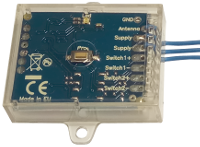
Creasol UniRec1 universal receiver can be connected to the SCS SENTINEL board ACCESS-602 to allow controlling that board by another kind of remote control, for example to use a single remote control to open more than one automation.
Connect one Power Supply wire to terminal 11
Connect the other Power Supply wire to terminal 12
Connect Switch+ to terminal 4
Connect Switch- to terminal 3
Then, program the receiver to learn one or more remote controls, and check that it works.
If it does not open the automation, exchange the connections to terminal 4 with terminal 3, and vice versa.
New and updated products
News
- Een doe-het-zelf-slimme wallbox maken in samenwerking met Home Assistant om elektrische voertuigen op te laden
- Creasol DomBusGateway: DomBus 2 MQTT-brug voor HomeAssistant, NodeRED, OpenHAB, ioBroker, MQTT...
- Uurtarieven en -kosten voor elektriciteit voor EU-landen, en prognose van de productie van zonne-energie: Domoticz-script
- FAQ veicoli elettrici e fotovoltaico
- Een geoptimaliseerde Rasbian + Domoticz-image installeren op een Raspberry Pi 3, Pi 4 of Pi 5.
- Het integreren van een verlichtingssysteem met stapsgewijze relais in Home Assistant, Domoticz, ...
- Het verbinden van een netwerk van DomBus-modules via TCP (WiFi, Ethernet, ...) of draadloze radioverbinding
- Hoe een domoticasysteem te bouwen met behulp van DomBus-modules
- Suggesties: wat je moet voorbereiden in een nieuwe (of gerenoveerde) woning om dit te kunnen automatiseren
- CR2032 Lithium-Manganese battey passivation layer
- Creasol DomBus and Home Assistant
- Domoticz, betrouwbaar gratis en open source domoticasysteem
How to connect UniRec1 to SCS-SENTINEL ACCESS 602 CTRL 51
Creasol UniRec1 universal receiver can be connected to the SCS SENTINEL board ACCESS-602 to allow controlling that board by another kind of remote control, for example to use a single remote control to open more than one automation.
Connect one Power Supply wire to terminal 11
Connect the other Power Supply wire to terminal 12
Connect Switch+ to terminal 4
Connect Switch- to terminal 3
Then, program the receiver to learn one or more remote controls, and check that it works.
If it does not open the automation, exchange the connections to terminal 4 with terminal 3, and vice versa.
